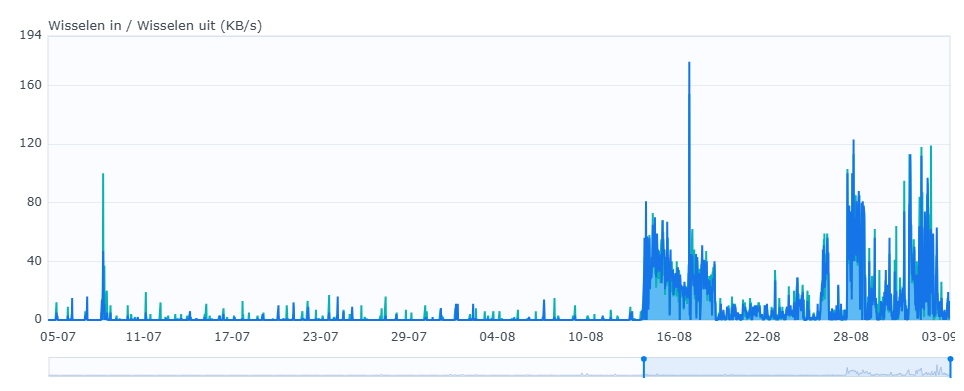
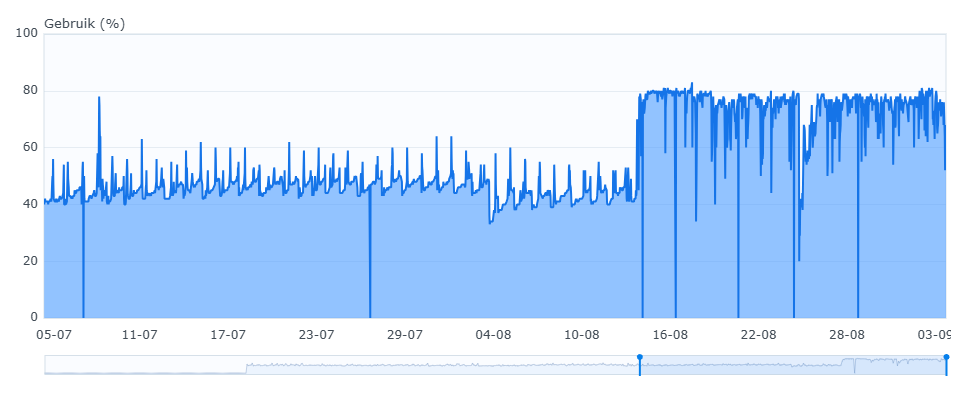
Just managed to find some stats from that slow NAS I was referring to earlier (Synology RS422, 2GB of RAM). This node holds about 3,8 TiB (~500k files). First picture shows swap, second shows memory usage (systemwide). You can clearly see when the update to v2 happened. The node is now running v2.0.6 (with that memory pragma change). Note that after the update I also re-synced a bunch of folders, which is now finished - so it will be interesting to see what the next few days look like.
From this I think it would be worthwhile to investigate other means of reducing memory usage (Syncthing on a NAS seems like a common use case, and these things are often underpowered/old). Also reducing database size is likely to reduce memory pressure. (Was i.e. compression of database pages considered? Also I see that file names in the database seem to be kept twice, both in the row as well as in FileInfo - that’s not going to add up to a lot of data, but it does mean less rows will fit in a single SQLite page).
I can confirm that enabling disk compression (e.g. NTFS compression on Windows) still reduces the database size by 100% (e.g. from 5 GB to 2.5 GB), which is a lot, especially considering the fact that the standard NTFS compression is made for performance, not to achieve the best compression results.
On the other hand, using SQLite build-in tools like VACUUM doesn’t really decrease the database size by much for me (i.e. maybe by a few hundred MB, but much less than the disk compression).
For comparison, the old database barely compressed.
I did a quick search earlier and found a few options, but none of them look ideal to me:
SQLite offers a commercial extension for compression. Something like this would be the cleanest solution as it’s mostly transparent to the application, and it compresses at the page level (so the compression can fully utilize redundancy in e.g. file paths, device ID’s etc.). Unfortunately the official extension is commercial.
There is an open source (LGPL…) extension that provides functions for discretionary compression of columns based on zstd (basically you call compress(data, dictionary) in your SQL and some other function to calculate the dictionaries). This seems a lot of work to adopt, and also I’m not sure this is still maintained.
EDIT: they also appear to offer a ‘transparent’ mode to enable compression at row level for specific tables.
We could compress e.g. FileInfo and other large objects one-by-one (basically to what the above extension does on the Go side), I’m not sure if that would lead to much gain.
The final option would be to optimize the structures we write to the database (like FileInfo) and strip out stuff that isn’t absolutely necessary (for instance the redundant file path).
Of course a proper way to approach this would be to first analyse why the v2 database is larger than v1 (you might have some metrics?) and then see if these elements are compressible/could be made smaller.
Yeah none of those alternatives seem like fantastic ways forward to me… I’m sure you can shave a few percentages here and there by compressing some things and manually removing attributes that could be rehydrated from a column, etc, but I don’t think it’s worth the effort and complexity.
One is a simple, stupid key-value database with an enormous amount of custom logic on top, the other is a SQL database with several indexes and cross references. I don’t know what any analysis would yield here, beyond the obvious – it is what it is.
That doesn’t mean we can’t optimise the structure of course, just that I don’t think comparing it to the v1 leveldb is useful.
It’s mostly a list of block hashes, which is almost mathematically perfect random noise. You’re welcome to try and benchmark it, but I suspect it’s just cpu cycles heating the world for no good reason.
(The exceptions being files with lots of repeated blocks, like zero-filled ones. I don’t think these make up a relevant amount of the data out there, though. Maybe for VM images?)
If (after VACUUM) there is still a lot of compressibility, and that is not due to the largest table’s contents (which is mostly mathematical noise) then I’m very curious what causes it to be still so compressible. This can either be something in the storage format (padding or wasted space in the pages themselves, but not due to fragmentation. Maybe look at dbstat), indexes, or redundancy in the contents. For the latter we might try the following: for each column, make a copy of the database, set column to NULL, VACUUM, then compare compressed size against original size.
I had longer replies, but I’ll do the short version. I think y’all should try out the suggestions you have and do the analysis you suggest, instead of suggesting I do it. Be the change you want to see.
My suggestions should not be read as ‘please go do this’ When I find the time I will have a deeper look myself of course. I do think a discussion is worthwhile for gathering data points, and also to see what has already been considered and what not.
Yeah, and something like page level compression would be nice, but as you also found when you went looking just isn’t a thing that exists as far as we’re concerned. If this is something you feel should exist, I guess the proper place to implement it is in SQLite…
My database compresses from 1.4G to 1.0G with tar+gzip. That doesn’t surprise me at all.
Let’s look at it the other way round. If a sizeable amount of space can be saved here through compression, then it must be due to either duplicate or empty data.
*** Page counts for all tables with their indices *****************************

FILES............................................. 211451      69.2%
FILEINFOS......................................... 87005       28.5%
BLOCKS............................................ 3494         1.1%
BLOCKLISTS........................................ 3326         1.1%
I’m going to go out on a limb here and guess that you’re carrying around millions of entries for deleted files that have no blocks associated with them.
(Which is fine, I know that’s how you roll, but it does change the equation on compressibility.)
(syncthing debug database-counts $folderID for the counts of that)
Yeah, although I’ve just got rid of my workaround to prevent removing deleted files from the database (as the default period of 1 year 3 months should be enough for my use case). However, this specific Syncthing installation/database is only 3 weeks old, so the deleted entries would still be kept in the database regardless.
More seriously, directories get a synthetic size of 128 bytes for reasons, apparently also in the deleted case. That’s not necessary, deleted files have a size of zero
I doubt it actually, because I’ve now checked which folders the two databases that compress so much are associated with.
The first one is the system’s Recycle Bin (which I add to Syncthing without sharing, so that it can re-use blocks from it), and the second is a parent path for all other Syncthing folders that ignores everything but .stversions directories (also to re-use blocks from them). The content of those is going to change constantly, with many deletions happening (e.g. in the case of .stversions, they are cleaned out after 1 day).

 ):
):

