Looks like this release wasn’t so good, though: [BUG] Unable to launch v1.7.9 on Windows 11 · Issue #352 · Martchus/syncthingtray · GitHub
I gave it a try and I cannot get it to connect to my server so I stay with Trayzor
Sorry to hear. Note that Syncthing Tray was never intended as replacement for Trayzor anyway.
The last update here is a while ago. In the light of the recent Syncthing 2.0.0 release it makes probably sense to mention that Syncthing Tray works fine with Syncthing 2.0.0. The next release will nevertheless contain a few improvements:
- The integration tests with Syncthing are updated and now also pass against Syncthing 2.0.0. Until then you’ll have to skip the tests, e.g. when building from the AUR.
- The built-in Syncthing version will be updated to 2.0.0. In case you’re not ready to update to Syncthing 2.0.0 and you’re using the built-in version of Syncthing you should also wait with updating Syncthing Tray.
Other noteworthy changes:
- The often requested updater was part of the last release and will in theory be able to update to the next release. Let’s see how well it works in practice. (Unfortunately I already know that it won’t work for the Windows ARM build as the validation is going to fail. This will be fixed in the next release of course.)
- The Android version kind of works now. There are limitations/caveats, though (see the README). Screenshots of the Android version can be found on the website.
If you want to help me testing the Windows and Android versions with Syncthing 2.0.0 you can find development builds on my build server.
Here also a few general things I noticed when testing Syncthing 2.0.0 under Android:
- When migrating to Syncthing 2.0.0 under Android (regardless of the used wrapper), make sure you’ll have enough free space on your internal storage. The new database will be significantly bigger and you’ll need room for storing both databases at the same time. (Of course after the migration the old database can be deleted.)
- But there’s also a huge advantage with SQLite: Now one can move the database to the SD card (which previously wasn’t possible on my devices as Syncthing failed to create the lock file).
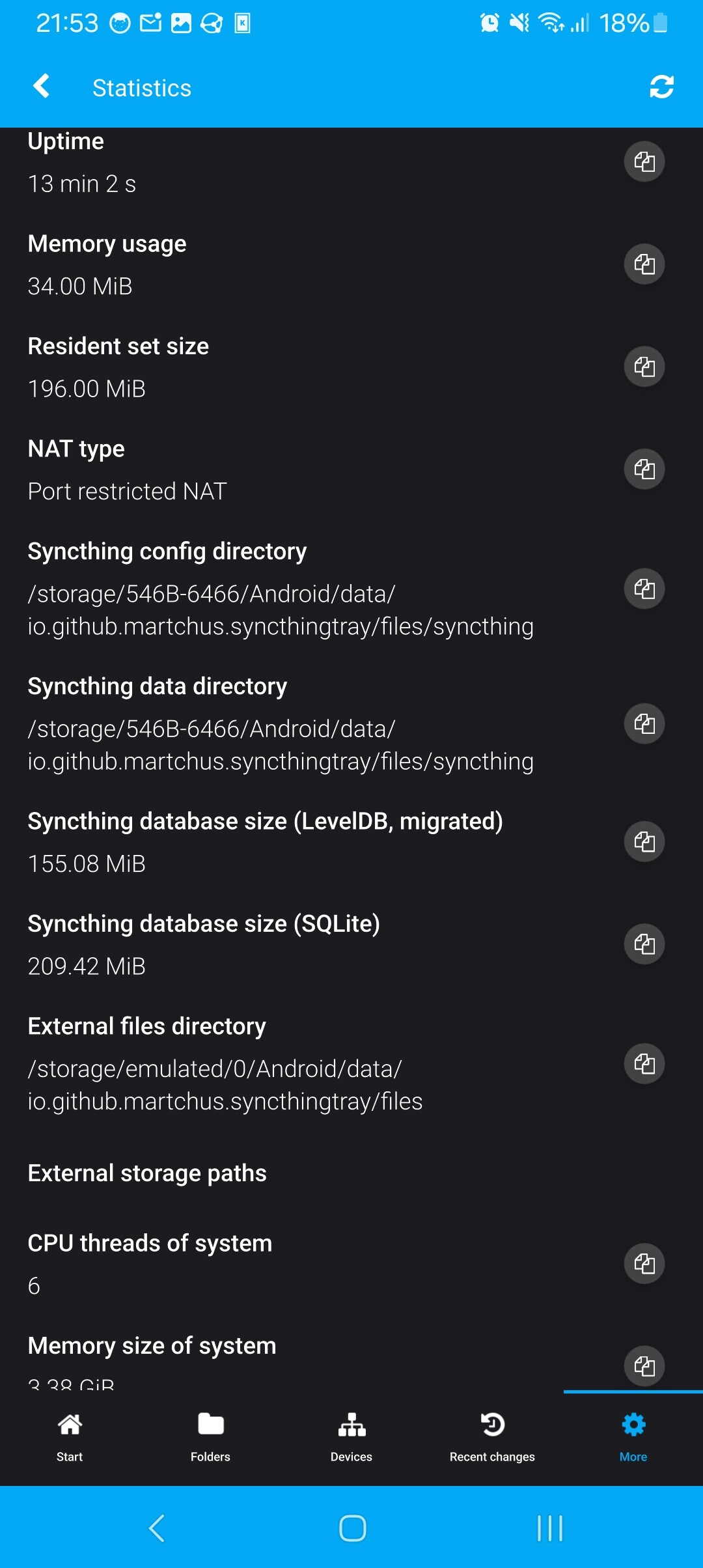
That’s how the database sizes/paths look in my case with Syncthing Tray on Android after moving the database to the SD card:
2 Likes
Why is this great tool not recommended and on the official Syncthing page?
Synctraysor was abandoned for years. Now that Syncthing 2.x is out, they’re waking up and getting referenced immediately.
Meanwhile, Syncthing Tray has, in my opinion, proven itself to be superior and present, it should be referenced on the official page!?
Why this form of discrimination?
( When I see that SyncTrayzorPortable-x64 is 594 MB uncompressed, I find that monstrous! )
I can probably just repeat my answer from the other thread:
I have never made an effort of promoting Syncthing Tray on the website because I believe the best way to get started with Syncthing is with just Syncthing. That’s also why Syncthing Tray is designed to integrate with an existing setup rather than forcing its own way of setting things up onto the user - even if it leads to a less streamlined experience.
So there’s no discrimination. I simply have never even tried.
1 Like
For me personally, it’s very comfortable to be able to keep an eye on Syncthing via your app. Especially since I monitor two instances, the other being a Syncthing LXC under proxmox from another device.
I also systematically install it for other people who are sometimes on the move, it allows them to pause the synchronization when they need to save resources (Hotel / VPN / Battery) or to possibly check for themselves if everything is normal, at a glance.
Syncthing Tray is lightweight, efficient, and well thought out! THANK YOU!
1 Like
For Flatpak/systemd users this could be useful if you want to run it as a service:
~/.config/systemd/user/flatpak-autostart@.service
[Unit]
After=graphical-session.target
Description=Flatpak autostart (%i)
PartOf=graphical-session.target

[Service]
# useful on NixOS
#ExecSearchPath=/usr/local/bin:/usr/bin:/run/current-system/sw/bin
ExecStart=flatpak run %i
ExecStop=flatpak kill %i
Restart=no
Type=exec

[Install]
WantedBy=graphical-session.target
systemctl --user daemon-reload
systemctl --user enable flatpak-autostart@io.github.martchus.syncthingtray
1 Like
That sounds useful for those using the Flatpak. So it would make sense to open a PR on the Flatpak repo adding this to its README. I just hope that flatpak kill sends e.g. SIGTERM and not SIGKILL.
1 Like
I’m not sure why there is no stop command but it is intended for stopping.
It could be useful for some users, but I doubt that most Flatpak users will visit the repo at all and see the README. A link in the Settings/Startup/Autostart info (or on the Flathub page) would possibly reach more users.
Hi, will there be development in the repositories for openSUSE Leap 16.0? Currently the latest version is for 15.6
I do understand that it just came out in november though.
I enabled Leap 16.0 repositories. Packages are still building and we’ll have to see whether changes are required to build for Leap 16.0.
1 Like
If anyone is interested in Syncthing Tray on Android, I just want to mention a currently ongoing discussion on GitHub you might find interesting.
Due to SUSE hack week I also had some extra time working on Syncthing Tray and the number of caveats/problems on Android is not so bad anymore. I’ve also recently updated the Android-specific documentation.
4 Likes
Sorry to ask again. Is it better to develop syncthing tray in windows or WSL?
I have no comparison between native Windows development and using WSL as I only do the former. Considering I haven’t used WSL yet I can’t help you or give concrete advice. For native Windows development I recommend MSYS2 mingw-w64 packaging which I use myself when developing on Windows. The README of c++utilities also contains concrete commands for this.
1 Like
Okay. Ive tinker with WSL a bit, only the Ubuntu instance Copy paste work in windows terminal app. Docker is fine. Probably linux inside WSL. Ive tried msys and its pacman. I like WSL import export as backup solution. I think I’ll go with linux option with WSL. Thanks for the answer.
Another important question will this QT-based wrapper be integrated into syncthing org or will it stay as community-fork?
There’s a suggestion to add the Google/Android/Java/Kotlin-based wrapper to syncthing org, just wanted to know. since the battery issue seems serious, I’m gonna try the dev build, and see for any errors in github discussion, if it goes smoothly then the github discussion could be closed.
At this point I don’t have any plans to move the Syncthing Tray repo under the Syncthing orga. There are almost no other contributors and for me this is just additional effort.
2 Likes
Does the beta release this time only include turning off local discovery to conserve battery life and thus is stable, or does it not move into stable release until volunteer used it?
is there a way to add your beta website url into obtainium config, or could you mirror it into an alt github account?
without obtainium, its hard syncing multiple devices (app update using obtainium* - edit 1).
The repos for OpenSUSE Leap 16 still don’t have the syncthingplasmoid-qt6 and syncthingfileitemaction-qt6 packages available. (I’m not asking for an ETA, just reporting.)