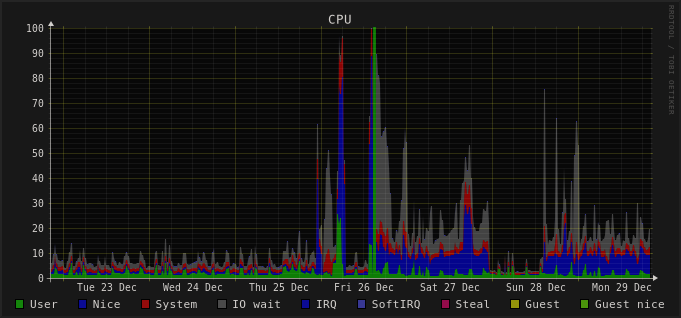
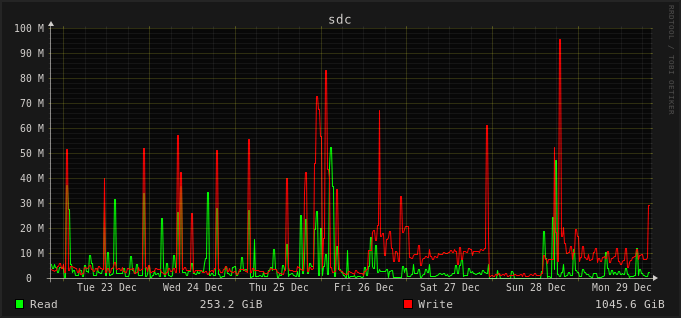
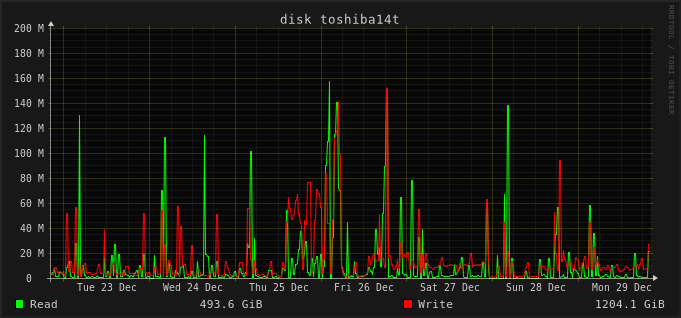
This is how the CPU usage looks on the slowest machine I have, I’ve upgraded on 26, and since that I have an almost constant nice usage from Syncthing and a lot of IO wait. On Dec 28, I shut down Syncthing for a half day, the difference is clearly visible. Here’s the disk IO graphs from the same timeframe:
This is two HDDs running on BTRFS RAID1, and both the syncthing db and the synced folders are on the same drive. There’s an other topic mentioning initial scan is slower ( Syncthing 2.0.2 first scan extremely slow ), but here’s not just the migration (which took like 6 hours), but everything after it is way slower. Syncthing 1.29.5 was perfectly usable if not the fastest (after the initial rescan was completed after a reboot), but Syncthing 2 is barely usable. The other topic mentioned that I should get an SSD, but the thing is even on my laptop which only has an nvme SSD (Samsung 990 PRO), I noticed the fan spinning up way more often after the Syncthing upgrade (probably not helping battery life, but I didn’t test that).
Oh, I forgot to mention, but I’ve already set rescan intervals to 10 hours and disabled inotify (this machine is only used as a backup, there’s no need to rescan so often, and restating 1.4 million files on a HDD is not a fast operation). But still, as long as any file changes on any other computer, Syncthing starts syncing it, and it results in way more IO and CPU usage than previously. (And something almost always changes somewhere…)
That’s not my observation. As you can see, I’ve been running the new version for a few days now, and things doesn’t seem to settle down.
Also somewhat maybe related, I have a script that when runs, calls /rest/system/connections and /rest/db/completion every 0.1s to wait until syncing settles down. With v1.x this was a practically invisible operation, now with v2, it sends Syncthing into a constant 100% CPU usage.
If the files don’t change locally at all, why not increase the rescan interval even more? In a similar use case, I usually set it to something like once per week (604800 seconds).
I can try this, but I doubt it will help. It looks like the problem is other computers pushing the changes onto this box. I can only think of silly workarounds, like starting syncthing, wait until it finishes syncing changes, then shutting it down, only restarting it a day later or something.
Yeah, that’s a pretty basic script I hacked together quickly and never touched it (Also looks more complicated, /rest/events?events=FolderCompletion doesn’t return anything until there’s some change, so I need to call /rest/events first, then concurrently all the /rest/db/completion calls, which means I should probably convert the script to async…).
Just an extra data point, right now Syncthing says uptime 4d 9h 36m and htop says 1d 11h 42m for CPU time used. That comes out as a 33% average CPU usage. Ouch.
The main and super simple thing to check (or even better believe and do right away ) is imo:
No need for complicated async or whatever scripts, call completion endpoint once then use events. Or even simpler to validate, just stop your script or increase the interval massively.
Ok, sorry, I think I didn’t tell it, but this script runs once a day, and usually it finishes in anything between 10 seconds and 2 minutes depending on how overloaded synching is. I’ve increased the interval as a very quick hack, but it won’t help with the big picture unfortunately.
This was discussed here, approximately second half of the topic:
Internally, we are running a version with altered indexes design (hash indexes), improved lookup locality for hash table fixes (locality prefix on indexed fields), which brings disk IO back to v1 days, or even less. Our changes listed in the topic. Was critical for us in our case. Approximately “several” millions of files or “hundreds” gigabytes of data is a threshold where current v2 DB design is causing resource usage beyond usable. Nothing can be done by user side tweaking here.
Unfortunately, our in-place hack is very dirty code and we are yet unable to provide a PR with all this, due to lack of migration paths, dirty code, removed some exceptions format support, etc. I can only repeat feedback that we did all as listed in the topic and it just works, reducing DB IO context to approximately 10% of current.
Reasons why not to implement all proposed is also listed in the topic: complexity and not-like-at-school DB design approaches. Current syncthing code is highly manageable and by-the-book abstractions layers based. Good for mass product that you need to trust. For scalability, questionable, but developers choice here.
 (Also looks more complicated,
  ) is imo: