Syncthing disk image is malformed error?

I have been having some issues with Syncthing since the migration. I am running v2.0.8 on an Unraid server.

For a few days, I would get the red can’t communicate error on the GUI suggesting refresh, the browser, restart syncthing or try another browser. (apologies I don’t have a screen shot of the exact error, as my GUI is no longer accessible!)

Since this morning, I can’t access the GUI and in the logs, I just get the below error every couple of seconds!!

Any ideas, or help would be very appreciated.

Many thanks

2025-09-12 09:01:34 INF syncthing v2.0.8 “Hafnium Hornet” (go1.24.7 linux-amd64) root@buildkitsandbox 2025-09-08 08:21:19 UTC [modernc-sqlite, noupgrade] (log.pkg=main) 2025-09-12 09:01:34 INF Calculated our device ID (device=XXXX log.pkg=syncthing) 2025-09-12 09:01:34 INF Measured hashing performance (perf=“1919.39 MB/s” log.pkg=syncthing) 2025-09-12 09:01:34 ERR Database error when getting previous version (error=“getkv: database disk image is malformed (11)” log.pkg=syncthing) 2025-09-12 09:01:34 INF Exiting (log.pkg=syncthing)

I’m not sure what’s going on here but my first idea is to shut down Syncthing, move the database and start it up again.

If you have a lot of Folders or files, it might take a while to rebuild.

Thank you for your reply. That does make sense. I do have a lot of files and Folders it is syncing to 4 other devices! I am happy to give this a try though and not bothered how long it will take.How do I move the database?

Would I then have to re-create shares etc. ?

Many thanks

The configuration file isn’t affected.

I’m on mobile but the database is normally in Syncthing’s configuration directory.

Thank you.

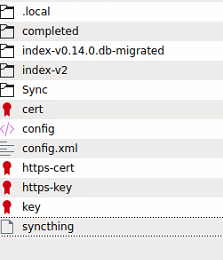
This is the directory structure I have for syncthing:

there doesn’t appear to be a config directory?

As it has recently migrated, It looks like I have 2 database folders? Do I just delete both?

I did some googling, and the command to do this is:

syncthing –reset-database

But If I do this from the unraid CLI, I just get unkown command. With syncthing shutdown, I am not able to acess it’s CLI (there is no option) ?

Really stumped, and don’t want to do the wrong thing, as it would be a lot of work starting from scratch!

That’s Syncthing’s home directory. The configuration is in the config.xml file. The database is in the index directory. You can shut down Syncthing and rename that directory.

Thank you. Should I rename both index folders?

index-v0.14.0.db-migrated

index-v2

I bit the bullet and renamed both. All seems to be back up and scanning now. All devices and folder shares are all connected. So a good start :slight_smile: .

I would just like to suggest to make sure that your hardware is fine (e.g. check SMART, etc.).

1 Like

Yeah that, or if there are filesystem shenanigans going on with unraid, and/or the modernc build it’s running might be less than awesome in combination with the above.

1 Like

Thank you both. Yes, all disks are all good with Smart. So far so good with the re-indexing :crossed_fingers:

1 Like

Sorry for that – maybe I shouldn’t be on the forum on my phone :slight_smile: .

The pre-migration index database is the one that ends in “migrated”. The other is the live index.

No problem :slight_smile: I really appreciate your help.

It’s still re-building, think it might take awhile….

1 Like

Finally…. All synced again. It was a little odd, as one of the shares which were pretty much in-sync before the upgrade, had to re-sync 350+ GB of data, which seemed a lot slower than before! But all is back working again :slight_smile:
1 Like

Sometimes Syncthing will look like it’s syncing files, when it’s actually syncing indexes.

I’m happy that things are working!

Yes, that’s true. It did literally take days, but I am happy too that it is all back working. Thank you for your help.

1 Like

This topic was automatically closed 30 days after the last reply. New replies are no longer allowed.