Files are locally modified when logs says they are unchanged

Before I start, I should mention that this is in relation to a send-only / receive-only folder pair, as I’m aware they seem to have more problems than the normal folder type.

Basically, I copied the contents of a directory to another machine using a different tool, and now I want to use Syncthing to ensure they stay synced in future. These changes should only ever travel in one direction, hence the send/receive only choice.

What I found is that once I set up the folder, it is reporting that two-thirds of the files are ‘locally modified’ on the receive-only side. Yet I know the files are a perfect match, having checked the hashes and creation/modification dates. Even the log files seem to indicate that the files match, since the log contains an “unchanged:” line for each file, which the source code in walk.go suggests the files actually matched.

I don’t want to click Revert Local Changes because it’s unclear what that will do, given that there are actually no local changes. I don’t want to resync the data as that will be very time consuming.

I’ve confirmed that I can drop a new file in the send folder and it successfully syncs to the receive folder. It’s just the files that were there when the folder was first set up which (mostly) have this problem.

Does anyone have any ideas why the displayed status of the folder seems to be a mismatch both for the actual file state and for what the logs seem to be saying?

1 Like

What operating systems are involved, and what filesystem is the folder stored on? Have you checked the “ignore permissions” option in the folder’s advanced configuration?

You can get a complete picture of what differences Syncthing sees for each file, but let’s start with the basics first.

Send folder: Windows 11 / external USB drive / NTFS

Receive folder: Ubuntu 24.04.3 / external USB drive / exFAT

Ignore Permissions is currently set to Yes on both sides. It may not have been when I first synced the folders but subsequent Rescans since then have made no difference.

Thanks for your reply. Sadly I’m not confident about how to proceed. A rescan on the send-only side does nothing and there are no changes on that side to override, no button to press. I only get the option to override things on the receive only side, and I don’t want to take the risk of that deleting files and requiring them to be resent. “Typically” only aligning the database, and not the files, is not a strong enough guarantee for me to want to press that button.

To build confidence, you can calculate the hash of some of the files in question on each side (using e.g. md5sum). If they match, there are indeed only metadata changes.

The timestamp resolution in these filesystems differ. Maybe set modTimeWindowS to 1 or 2?

Syncthing Configuration — Syncthing documentation says:

modTimeWindowS

Allowed modification timestamp difference when comparing files for equivalence. To be used on file systems which have unstable modification timestamps that might change after being recorded during the last write operation. Default is 2 on Android when the folder is located on a FAT partition, and 0 otherwise.

I’m already confident that the files match, and as I mentioned in my first post, the hashes match (and there is nothing I could have done to modify the files anyway). The confidence is more about “what will this button do?” I’m used to version control systems where, when a system says there are local additions, opting to ‘revert local changes’ will delete those files or attempt to pull the originals from the source.

I read elsewhere on this forum that the modTimeWindowS value is not that useful so I hadn’t tried it before now. I have just set it to ‘2’ on the receive folder and clicked Rescan but it has had no effect.

Good!

There might more to it than what you yourself have done.

The button will restore files and their meta data according to their global state. If you are correct in what you say about file content being identical, then to be only remaining difference is meta data. Go ahead and press it. :slight_smile:

But what metadata? As far as I can see everything already matches. Deciding to ‘revert’ a change is therefore taking a chance that there’s some hidden metadata that I cannot see, which I could see no mention of in the logs, and is somehow going to be fixed by pressing this button when there seems to be no reason why it would not be identical in the first place.

I need some better diagnostics of what Syncthing has done here to be able to safely proceed.

There are some debugging endpoints on Syncthing’s API to show you all the details it knows about the global and local state. Sorry I can’t take the time right now to provide a how-to, hopefully someone else can help out. Or if you’re savvy enough, try to read through our documentation on /rest/db/file. Might be exposed directly on the command line as well.

We should have a FAQ entry for this situation…

Thanks for the REST API suggestion. Using that, I can see the following for one file I checked:

  • the global and local 'blocksHash’ values are completely different (despite the file MD5s/SHA1s being identical when tested locally on each platform)
  • the local/receiver ’invalid’ flag is ‘true’
  • the ‘modified’ timestamps are identical on both sides but ‘modifiedBy’ is that device’s id in each case
  • the ‘inodechange’ on the global entry is the timestamp=0 / Jan/1/1970 value (although the REST doc example suggests this might be normal)
  • permissions are different on each side (0755 vs 0644) and ‘noPermissions’ is false (which seems to contradict what I have for those folders in the UI, if that refers to Ignore Permissions? )
  • sequence numbers are different on each side
  • the local/receive folder has 2 versions for the file, the sender only 1.
    • One version is associated with the sender and is the same on both sides.
    • The second version is associated with the receiver and appears to be a timestamp 4 minutes later than the other.

Any idea what that means?

Different block list hashes with the same file content points toward a different block size being used. What Syncthing versions are involved?

Not sure about the invalid flag, that might mean the block list hash is not even relevant.

Please post the full response for one differing file, from both ends if possible.

On the sender: v2.0.12, Windows (64-bit Intel/AMD)

On the receiver: v1.27.2-ds4, Linux (64-bit Intel/AMD)

I’m guessing that could be the problem, though I’m surprised that it isn’t caught earlier or handled with a fallback.

Here’s an example of the data returned from the API:

{
  "availability": [
    {
      "id": "LFTQVFA-LCV7NZD-DNWSIPG-<redacted from the forum>",
      "fromTemporary": false
    }
  ],
  "global": {
    "blocksHash": "cu0U4dSzuU2gg2pFuaTr16bC1AS40VJaVcFVKmqCBLE=",
    "deleted": false,
    "ignored": false,
    "inodeChange": "1970-01-01T01:00:00+01:00",
    "invalid": false,
    "localFlags": 0,
    "modified": "2006-08-06T22:03:56+01:00",
    "modifiedBy": "LFTQVFA",
    "mustRescan": false,
    "name": "Aug 2006/IMG_0706.jpg",
    "noPermissions": false,
    "numBlocks": 2,
    "permissions": "0644",
    "platform": {
      "unix": null,
      "windows": null,
      "linux": null,
      "darwin": null,
      "freebsd": null,
      "netbsd": null
    },
    "sequence": 165,
    "size": 261937,
    "type": "FILE_INFO_TYPE_FILE",
    "version": [
      "LFTQVFA:1766340311"
    ]
  },
  "local": {
    "blocksHash": "5nzFvS6OiY1eCLl8s0tP92MkFaEagaRoTbKssOEhdEU=",
    "deleted": false,
    "ignored": false,
    "inodeChange": "2025-12-21T18:09:26.51Z",
    "invalid": true,
    "localFlags": 8,
    "modified": "2006-08-06T22:03:56+01:00",
    "modifiedBy": "FZL66JD",
    "mustRescan": false,
    "name": "Aug 2006/IMG_0706.jpg",
    "noPermissions": false,
    "numBlocks": 2,
    "permissions": "0755",
    "platform": {
      "unix": null,
      "windows": null,
      "linux": null,
      "darwin": null,
      "freebsd": null,
      "netbsd": null
    },
    "sequence": 1469,
    "size": 261937,
    "type": "FILE_INFO_TYPE_FILE",
    "version": [
      "FZL66JD:1766340577",
      "LFTQVFA:1766340311"
    ]
  },
  "mtime": {
    "err": null,
    "value": {
      "real": "0001-01-01T00:00:00Z",
      "virtual": "0001-01-01T00:00:00Z"
    }
  }
}

Different versions is not a problem.

Do you have the data from the other device also?

I do, but I won’t share my personal files up here. Happy to answer questions about it though I doubt the content is of any relevance.

Can’t edit the post above, but I just realised - do you mean the metadata from the REST API call?

If so, apologies for misunderstanding. But no, that’s not as practical to get as it’s on Windows and I don’t want to jump through the hoops to get curl working there.

Windows comes with curl.exe built in nowadays, however you don’t even need to use it, as you can use syncthing cli to obtain the same data from the API.

You do need to have the metadata from both sides to do a proper comparison though.

Generally I’ve come to trust syncthing. That said caution when you don’t understand what’s “different” is reasonable.

I don’t know the details of your situation but I would probably make a backup on the “receive” machine of the receive folder. just duplicate the whole folder tree with whatever method you trust. (Maybe copy/paste in windows explorer if on windows, for instance)

Then click the button and see what happens.

Anyway. Good luck.

Strange, I tried before I posted and cmd.exe told me curl was not a recognised command, and a search suggested I’d have to use cygwin to get it. Today it worked, so I’d obviously done something wrong.

This is the situation for the same file on the sender side:

{
  "availability": null,
  "global": {
    "blocksHash": "VvUCSEJspbrjPrcUUbvkCIcQ3mA2ZzkuFmHBeJltmeE=",
    "deleted": false,
    "ignored": false,
    "inodeChange": "1970-01-01T00:00:00Z",
    "invalid": false,
    "localFlags": 0,
    "modified": "2006-08-06T22:03:56+01:00",
    "modifiedBy": "LFTQVFA",
    "mustRescan": false,
    "name": "Aug 2006\\IMG_0706.jpg",
    "noPermissions": false,
    "numBlocks": 2,
    "permissions": "0644",
    "platform": {
      "Unix": null,
      "Windows": null,
      "Linux": null,
      "Darwin": null,
      "FreeBSD": null,
      "NetBSD": null
    },
    "previousBlocksHash": null,
    "sequence": 165,
    "size": 261937,
    "type": "FILE_INFO_TYPE_FILE",
    "version": [
      "LFTQVFA:1766340311"
    ]
  },
  "local": {
    "blocksHash": "VvUCSEJspbrjPrcUUbvkCIcQ3mA2ZzkuFmHBeJltmeE=",
    "deleted": false,
    "ignored": false,
    "inodeChange": "1970-01-01T00:00:00Z",
    "invalid": false,
    "localFlags": 0,
    "modified": "2006-08-06T22:03:56+01:00",
    "modifiedBy": "LFTQVFA",
    "mustRescan": false,
    "name": "Aug 2006\\IMG_0706.jpg",
    "noPermissions": false,
    "numBlocks": 2,
    "permissions": "0644",
    "platform": {
      "Unix": null,
      "Windows": null,
      "Linux": null,
      "Darwin": null,
      "FreeBSD": null,
      "NetBSD": null
    },
    "previousBlocksHash": null,
    "sequence": 165,
    "size": 261937,
    "type": "FILE_INFO_TYPE_FILE",
    "version": [
      "LFTQVFA:1766340311"
    ]
  }
}

I’m not sure if that tells us much of use except that somehow the same file has managed to be given 3 different hashes.

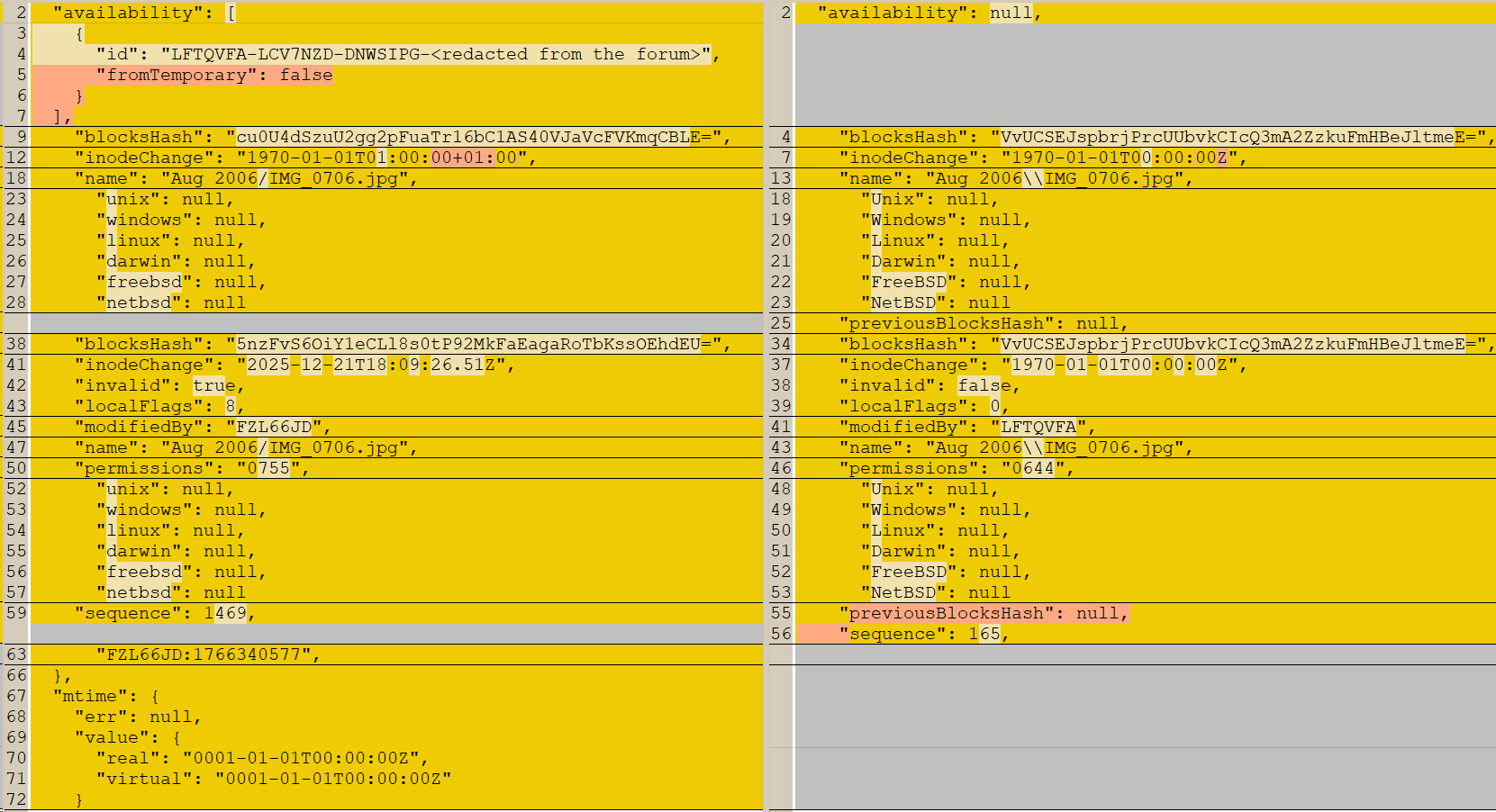
Just for the record, this is what you get if you compare the differences between the two: