The post is limited to 5 media embeds. The missing screenshots are here
Syncthing Setup Problems on OMV.odt (353.0 KB)
I’ve been trying to set up Syncthing with my OMV server for 3 days. My first goal is to set up a single file and folder to be uploaded from my smartphone to a SMB folder on the home server. Later on, I want to set up a folder structure for different types of media. But for now it is that simple.
I encounter two problems.
1. One is the error message “failed to scan” when I use the root user in the YAML file. Syncthing confirms successful sync (“100%” sycned) but when I check the respective folder it supposedly uploaded to, there is no file at all.
2. If I don’t set the PUID as root user (“0:0”), I additionally get another error that permissions are denied:
Failed to load/generate certificate (err=cert open /config/cert.pem): open /config/cert.pem: permission denied
Failed initial scan (error=“folder path missing” folder.label=upload folder.id=18cno-adu2s folder.type=sendreceive log.pkg=model)
syncthing
| 2025-12-31 02:28:27 WRN Error on folder (error=“folder path missing” folder.label=upload folder.id=18cno-adu2s folder.type=sendreceive log.pkg=model)
syncthing
| 2025-12-31 02:28:27 WRN Folder is in error state (folder=18cno-adu2s error=“folder path missing” log.pkg=model)
syncthing
| 2025-12-31 02:28:27 INF Loaded configuration (name=syncthing log.pkg=syncthi
Here is my home server folder structure. This path is set as a SMB:
here are my users:
This is the output of cat /etc/passwd
I used to have a docker_user user but I deleted it because I want to keep it simple and use SMBuser for all operations on the SMB share.
here is my YAML file, inside /appdata/syncthing:
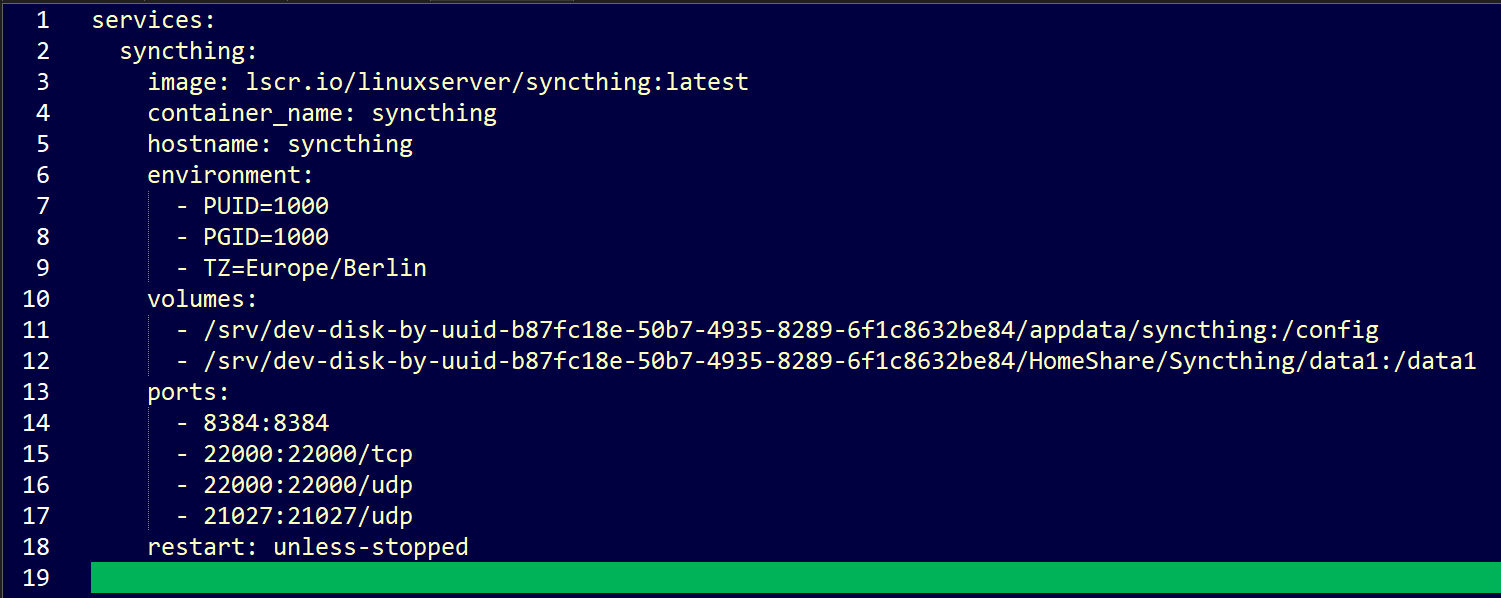
I get the same errors if I put the yaml file in its parent directories. Syncthing reports failed to read error on this path “/srv/dev-disk-by-uuid-b87fc18e-50b7-4935-8289-6f1c8632be84” regardless of where the yaml file is located.
1000:1000 is the default values. My SMBuser has that value right now. I get permission denied error UNLESS I choose 0:0 as values here. If I set it to 0:0 the permission error is gone but the failed to scan error stays.
==============================================
Today I logged in as root, and encountered folder visibility issues: (WinSCP view)
/srv/
it shows as this in the terminal (I am using PuTTy from Win SCP)

A nd the lack of vision continues in the subfolders too:
Compare this view
to this

right now I couldn’t even navigate to /appdata/syncthing to start Syncthing via docker compose up