Can someone advise on how to migrate from macos-syncthing to Synctrain?
Folders that are currently being synced using macos-syncthing have existing .stfolder and .stignore folders. Should these be deleted before pointing Synctrain at these same directories?
Is a MacOS version headed to the app store soon?
I’m also curious about whether or not it’s possible to disable Syncthing’s built-in web server for streaming media. I don’t believe I have a use for that scenario.
It should be possible to add the existing folders as-is to Synctrain. Synctrain’s instance of Syncthing will do a full rescan to build its own database again, but should accept the .stfolder as long as the folder IDs match. Just don’t run two Syncthing instances at the same time on a single folder. The .stignore file is supported as well (Synctrains selective sync feature will be disabled if you have your own stignore).
As for the built-in server - that listens on localhost only and only accepts requests signed by the app itself. It is a workaround to allow the video player built into the app to stream video from another Syncthing peer. There is currently no way to turn it off (I will consider adding a setting though) but there should also be no harm in leaving it on.
Your app looks great and I appreciate that you built and shared it.
Is the version in the MacOS App store somehow already including Syncthing v2? I see app version 1.10. I’m assuming an update to Syncthing bits requires an update. Is that right?
Yes, although I believe with the status check this could also be possible with a properly set loop.
Basically, what I’m trying to achieve (i do partially right now) is an automation that:
Regularly checks my photos folder and decides which photos have not been synced and adds them to an album “To be synced” (checks against another album “Synced”)
Once the sync schedule is activated, a connection should be checked and then manually start the syncing process with a device
When the syncing is finished (checked with another shortcut action maybe), the photos are copied from “To be synced” to “Synced” and then deleted from the folder in the Files app
This would be my perfect automation. I can achieve partially this behaviour by checking the app manually to see if there is a connection and then forcing the “Sync for a while” action in intervals of 15 seconds, and then verifying when its finished to trigger the last copying and deletion steps.
One way to achieve this would be to have a script on the receiving end, moving those files out of the synced folder some place. This would cause them to be deleted on your phone on the next sync. This may be a bit safer as it doesn’t depend on the phone’s view of your computer’s state of sync.
Synctrain v2.0, based on Syncthing v2.0.2, has now been released on the App Store for both macOS and iOS!
In addition to upgrading to Syncthing v2, the app has received many other smaller and larger improvements. Some highlights:
Everything should be more robust - handling of errors on startup and while transitioning between background and foreground should have been improved greatly.
There are more options for the photo backup and photo folder subdirectory structure. Also, photo backup now only attempts to export photos that have changed (when it can determine that).
You can now view web sites from folders - when a folder contains an index.html, it will be served over a localhost HTTPS server.
You can now peek into ZIP archive contents and extract files remotely without downloading the full archive.
Streaming performance has been greatly improved, with the addition of a block cache (that should prevent the app from fetching the same part of e.g. a video twice)
There is a new app icon - the old one was AI-generated and quite a misfit, especially considering the upcoming iOS 26 visual changes. Kai Werder offered to model the icon in 3D and that lead to the new icon, hope you like it!
Thanks to all those who submitted feedback and suggestions. If you have any further ideas, please send them through TestFlight (take a screenshot and write your feedback), the Github discussions page, or my email.
@pixelspark I have a feature request: some kind of way of manually triggering a photo backup without opening the app. Maybe from the menu that pops up when you long press the app icon on the home screen, or a widget.
I may have just discovered a small issue. I had a ton of thumbnails generated for a picture heavy folder(several thousand photos) and had no issues with it for a couple days, then I updated my phone, and now the generated thumbnails are gone… I’m guessing Apple cleared some cache to make room for the update and the thumbnails were lower on the priority list. Not sure if there is a way around that. I switched it over to store thumbnails in a custom folder instead of the phones cache, but not sure if that’ll fix it. Not the biggest deal in the world, just thought I’d throw this out there.
I set up a shortcut that will run synctrain in the background every time I open the folders app or a folders related app(word, excel, runestone, etc.) and whenever I plug the phone in or connect to home wifi. It’s worked remarkably well over local, but takes some time over cellular. That’s a limitation of Syncthing though, not Synctrain. The background syncs are already as good as the Apple overlords will allow and a few good shortcuts will fill in any gaps. I rarely find myself needing to open Synctrain to keep folders up to date.
Not really an issue, the system is expected to clear out the Cache folder for each app every now and then, if there is little space free then a little more often. Your solution is the correct fix if you want the thumbnail cache to persist.
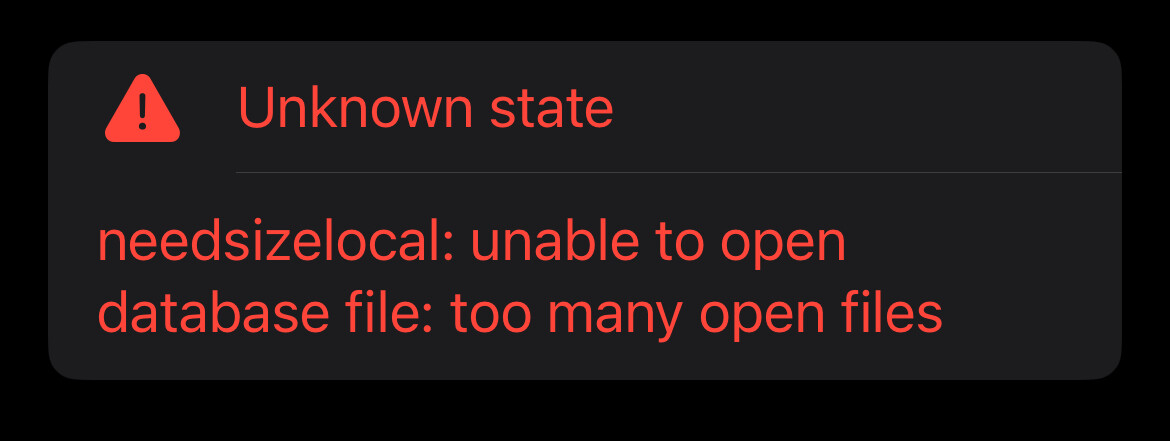
Been getting this odd error for a few days now. The app opens and connects to all the other devices, and a few moments later every folder errors out with this message. All syncing stops and connection to other devices is severed. Even after waiting a while, it doesn’t reconnect. Only restarting the app fixes it, but only for a few moments before it happens again. I did switch thumbnail caching over to a synced folder. Not sure if that could be part of the problem, but thought I’d include that. I’m on the stable App Store branch on an iPhone 13 Pro running 18.6.2
Are there known problems connecting Synctrain OSX to ordinary Syncthing clients? On our Linux client, we can see error messages like this. They are not even able to connect: