syncthing ignores the .stignore file

On laptop a I added a directory. Here is the .stignore file:

$ cat .stignore .idea/ *.iml .claude/

I shared that folder with laptop b. When the banner poped up in laptob b I accepted the share.

It immediately sent the files in the .stignore in laptop a to laptop b before I could add the entries in the web ui.

This looks like a serious bug.

Is there any way to get syncthing to stop syncing these files?

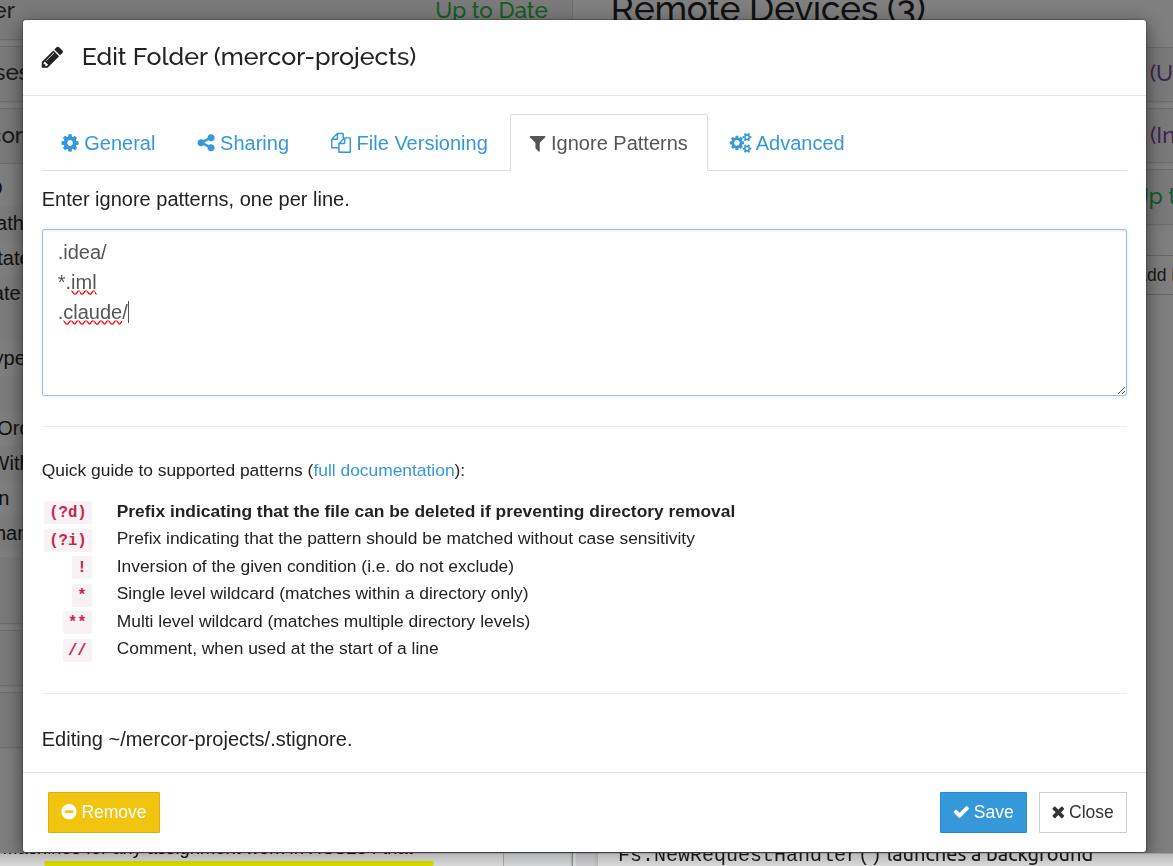
Please post a screenshot of the ignore patterns as shown in the Web GUI. I suspect something may be wrong with the syntax.

It looks like the screenshot reply failed. Here’s my .stignore:

$ cat .stignore

.idea/

*.iml

.claude/

The screenshot was blocked the forum’s spam filter, but it should be visible now.

The ignore list looks correct. What do you want to ignore specifically? Currently, your patterns match all files/folders ending with .iml, and everything inside folders called .idea and .claude (but not the folders themselves).

Please keep in mind that setting ignore patterns after the fact won’t have any effect on files that have already been transferred. You will need to delete those manually.
I want to ignore the folders as well as the contents for the .idea/ and .claude/ folders.

You need to remove the forward / slashes and just use .idea and .claude.

This topic was automatically closed 30 days after the last reply. New replies are no longer allowed.