I have an external hard drive attached to a PC on which I can dual boot into either Windows 11 or Fedora 42 (KDE). I have one folder on this HD that I have synced via Syncthing, originally set up on the Windows drive.
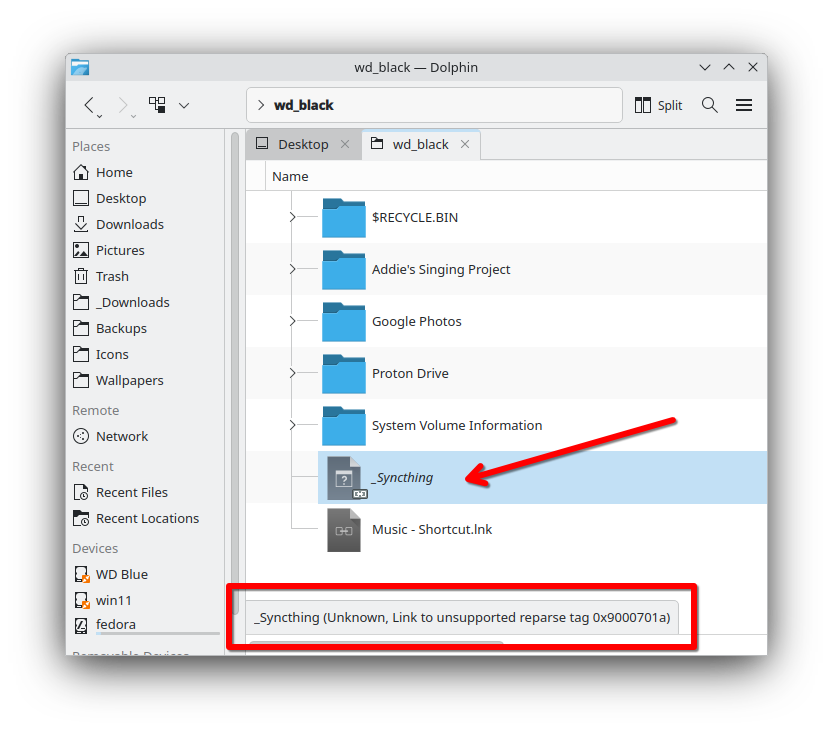
When booted into Fedora and I mount/view the contents of this drive, all of the folders can be accessed without issue except for the _Syncthing folder that I had set up in Windows. As you can see in this screen shot, I get this error message in the status bar: Unknown, Link to unsupported reparse tag 0x9000701a
Thanks for the reply. I suppose the solution proposed in the Nextcloud forum is easy to try, so I’ll do that, but both your links are solutions to different syncing platforms (Nextcloud and OneDrive).
The OneDrive solution appears to be very specific to a “files on-demand” feature, so I don’t know what to do with this one.
 Just a simple folder renaming.