I want to sync, [download] images taken with my android phone automatically to my desktop to a designated folder whenever I’m within the local WiFi range.
But I can’t get it to work.
My current overall set up with syncthing is as follows:
All my data and various data folders and sub-folders are on my desktop on drive D under a master folder named Datasync. The Datasync folder is synced with syncthing to my 2 laptops. They too have a D partition with a master folder Datasync. All is okay and works.
As for my mobile, want all images [taken with my mobile phone] I want to have synced [images transferred], [one way “sync” phone to desktop] stored in a folder on my desktop (D:\DATASYNC\3. Cell Camera\Mobile Dump) whenever there are new images and WiFi available.
I understand that I not need to add above folder on my desktop as the root folder wherein it resides as is already setup in syncthing on the desktop.
But I’m stuck as I cannot find settings I think should be there for what I intend to do.
Anyone know how?
Sync the whole folder to the phone, but set ignore patterns on it to only consider the relevant subdirectory. That however assumes that the folder layout is the same, which is probably not true. Your Android pics will be in DCIM/*, not in DCIM/3. Cell Camera/Mobile Dump/*.
Add another sync path to the phone, nested inside the complete folder. You add another shared folder in Syncthing to D:\DATASYNC\3. Cell Camera\Mobile Dump which is shared to the phone. Syncthing will warn you that this path is nested inside another shared folder - more on that soon. Then accept it on the phone and point it to the /storage/emulated/0/DCIM path.
The potential issue with this is circular sync. As long as the second (nested) folder is only shared between one PC and the phone, it’s alright. But if you start setting up the same path to share directly to your other laptops as well, you effectively have two paths for propagating changes between the same files on the PC. Once through the overall DATASYNC folder, and also indirectly via the phone, just for the photo subdir. At the very least you should then ignore the sub-path in the overall folder and rely only on direct synchronization of each PC / laptop with the phone. That’s fragile and easy to get wrong, hence the warning about nested Syncthing folders.
Either way, you will not have true one-way sync. That’s simply not what Syncthing was designed for, so its between troublesome and impossible to force it into such a mode. Effectively, whatever you do on the PC will be reflected to the phone, and especially deleting pics on the phone (to regain space) will also delete them on the PC.
The much better alternative would be:
Set up the photos sync separately on a folder outside your existing DATASYNC. You can then go to a full mesh style and even share that one between phone and all PCs, as well as among all PCs individually. Whoever is online will propagate changes, very robust. Then you have all photos on each PC. When your phone needs cleaning up, you MOVE them from the extra folder back into someplace within DATASYNC. That will make the phone delete them locally. All other PCs will apply that deletion as well, but also an addition in the main folder. If you’re lucky (and Syncthing tries hard to achieve this), the files will be copied locally on each device (because it can re-use the existing file before it’s deleted), so no redundant network transfers.
The downside is that you cannot start cleaning out photos on the phone, because they would also disappear on the PCs before you copied them to a safe place. A scheduled task that simply pushes everything from the secondary folder to the main folder sub-path would minimize that risk though, if you don’t have the discipline to never delete photos on the phone directly (which you want to keep elsewhere).
I have a daily script on my computer (NAS) that hardlinks the pictures from multiple phones to a directory outside of the Syncthing Phone → NAS folder pair. When they get deleted from the phone they still exist in the other directory, and because they are hardlinks on the same file system they don’t take up extra space. This works on *nix (FreeBSD, Linux) very nicely.
The “external folder” is shared by Syncthing to multiple computers, but not with the phone.
I spent most of the weekend trying to get this to work but considering the time I spent, I probably can do it manually for the next 10 years!
Aside from a rather convoluted and illogical and rather chaotic config menu structure on the phone, one core issue appears to be that it fix assumes the camera default path.: My PC\Galaxy A14 5G\Internal storage\DCIM\Camera “internal”
Whereas in my phone and setup I store all and everything on the “external” SD card My PC\Galaxy A14 5G\SD128GB\DCIM\Camera path.
Trying to get the original “emulated” android path seems to be impossible.
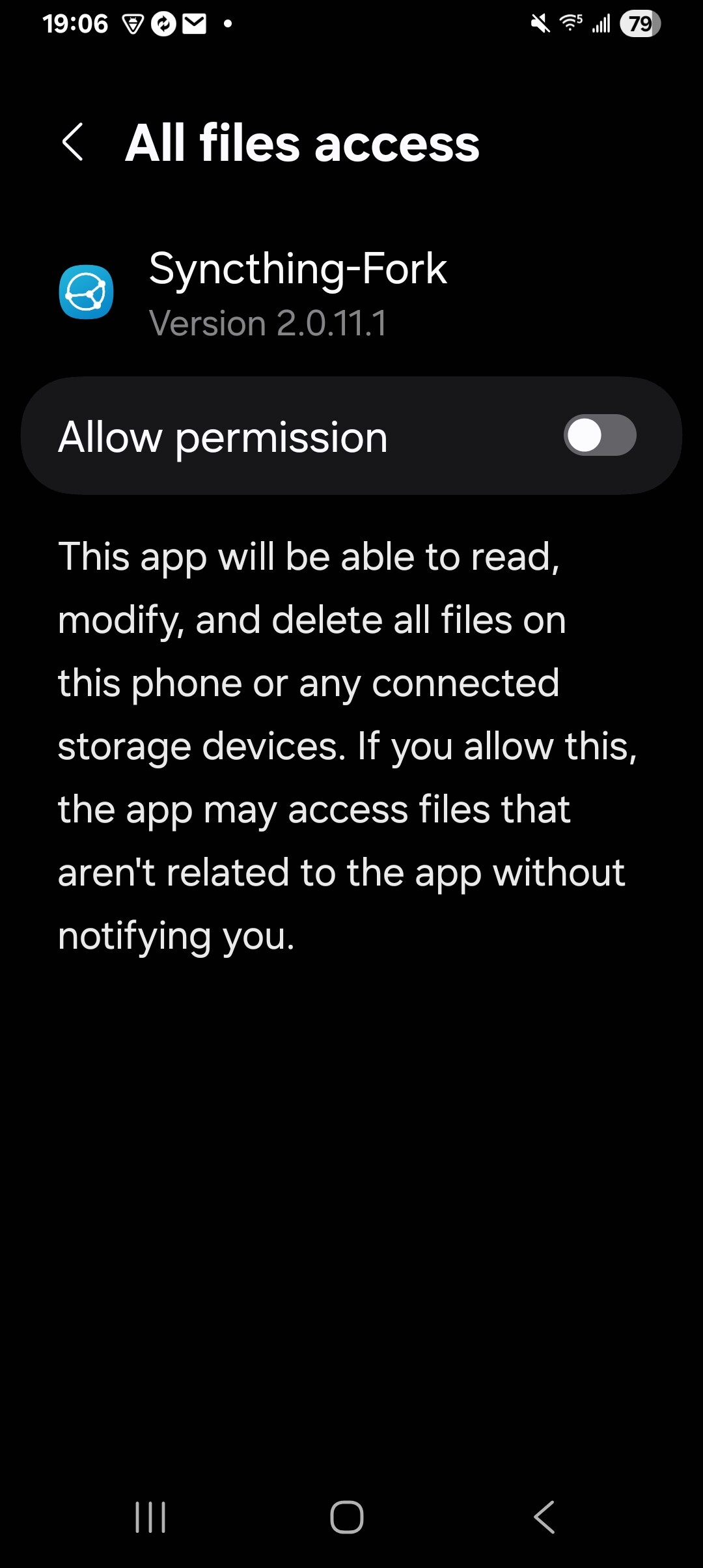
Checking if I might need an updated android version of syncthing, from the 6 app entries named syncthing all end up being the same, a syncthing-fork with an either absurd consent demand or poorest English written request I will certainly not agree to. (attached screen image below)
Being a big fan and promoter of the KISS principle I resolved it quicker and easier manually!
There are several alternatives by now. The long-standing, but somewhat shaken by intransparency, Syncthing-fork app, the BasicSync app and SyncUp, and even a beta of SyncthingTray on Android, all allowing to run modern Syncthing on Android.
I don’t really understand what troubles exactly you were fighting with regarding the storage paths. But glad you found a way that works for you.
Thank you for your reply.
Yes, in matters transparency as you mentioned i.e. syncthing-fork of which I posted a copy, is absolutely unacceptable to consent to. might as well sign over my bank account for free use. It is actually amazing in the day and age were every week another scam and data breach happens that this is so loose and open-ended accepted.
I will review the others you mentioned but honestly, if I have to do it manually as I always did by uploading from my phone to my desktop, then so be it!! That 1 or 2 extra minutes don’t matter!
The troubles I had is some incompatibility respectively apparent default path on the phone. As mentioned in my post, the app persistently looked at the default camera image storage path on the phone which is the “internal” storage device whereas I have my phone configured and store my images on the “external” storage device, the SD card.
Other mysteries were that it never connected although all confirmed “seeing” each other.
There is only so much time and patience I have and I am willing to invest to get something to work. As I mentioned, I’m an adherent and ideologue of the KISS principle! (you can look this one up on the Internet)