Gah… Here’s what I’ve said in another thread. Posting here for continuity.
You can??!
I have only ever seen a filename, and knowing only the filename is inadequate.
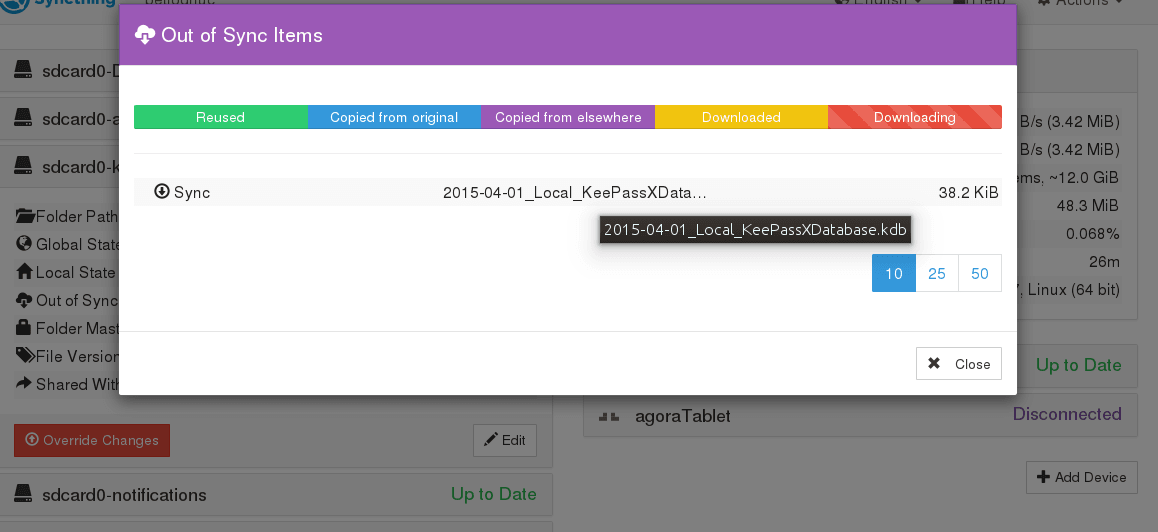
What I am suggesting is something like a standard file replacement notification dialog:
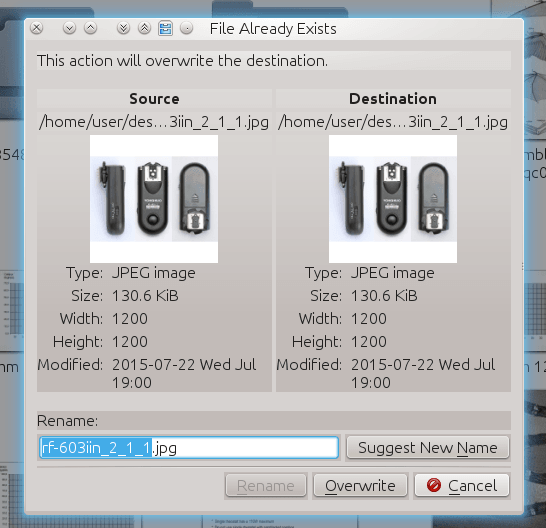
But with a layout appropriate for comparing numerous versions of the same files.
eg:
device - path           - filename  - filesize - datetimestamp
[ ]  server - ~/pictures     - file1.jpg - 100KiB   - 2015-07-29--00-00-00
[ ]  tablet - /sdcard0/DCIM  - file1.jpg - 100KiB   - 2015-07-29--00-00-00
[X]  phone  - /sdcard0/DCIM  - file1.jpg - 200KiB   - 2015-07-29--00-00-01
  [X] = version to assimilate into Master Folder.
  Other versions will be stored as per backup policy.
An extension to the existing “Out of Sync Items” window: where clicking an entry opens the type of options dialog I describe above.
Or maybe something like:
file1.jpg - Exists as 3 instances - select action:
[A][B][D] device - path           - size   - datetimestamp
[ ][B][ ] server - ~/pictures     - 100KiB - 2015-07-29--00-00-00
[ ][ ][D] tablet - /sdcard0/DCIM  - 100KiB - 2015-07-29--00-00-00
[A][ ][ ] phone  - /sdcard0/DCIM  - 200KiB - 2015-07-29--00-00-01
[A] = Assimilate into Master Folder.
   [B] = Backup as per backup policy.
      [D] = Discard file.