Ok - a couple of data point tangents here, then an update:
This installation is using the SynoCommunity Synology package - and I’m glad to report that updating the Syncthing binary from within the Syncthing UI worked perfectly! It looks like the package is already using the long-form options, so there weren’t any launch issues around this.
As this device hadn’t completely rebuilt the database, it was still ‘only’ 30GB - but the migration worked smoothly:
[start] 2025/06/10 14:08:39 INFO: Migration complete, 8703987 files and 212964k blocks in 67h21m49s
Resource usage was typically about 60% CPU and 20% RAM (16GB RAM installed) during the migration. Individual folders’ migration would get slower as they worked through - but I’m guessing that’s related to inserting records into an increasingly-large database.
I’ve only unpaused a couple of folders so far, and it does largely appear to have fixed the original issue. However, I’m now having the same problem as in Global and local state mismatch (v2) on each of these folders: the folder says it’s Up To Date, but the Global State is inflated compared with what it should be:
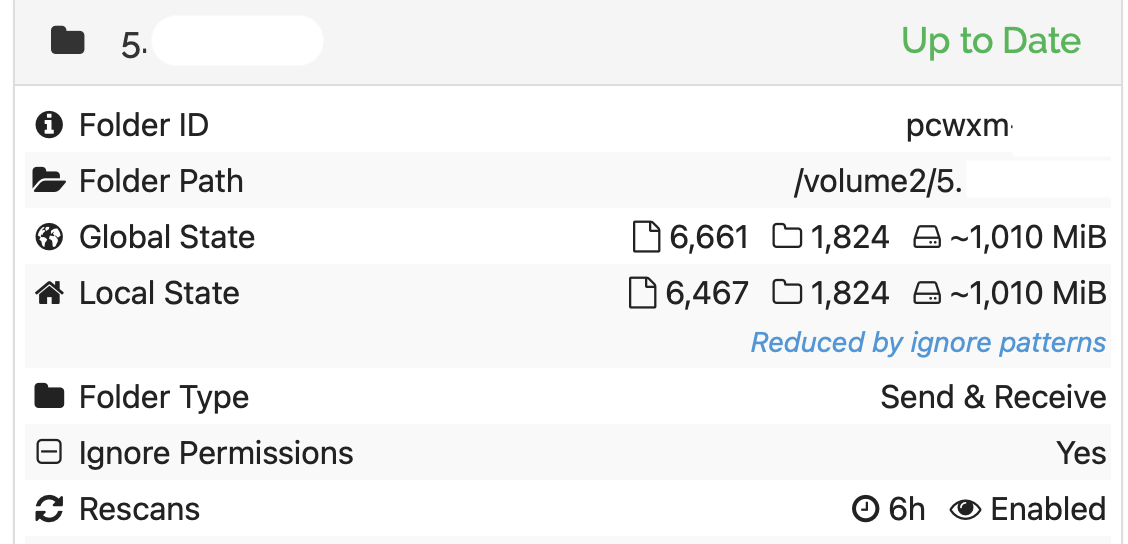
It looks like you’ve already identified this regression - but I don’t believe the steps that lead to this example are the same as in that other thread. (Certainly, these folders have been syncing fine for some years.)
Please let me know if it would be helpful to send you the database - but I appreciate that, as the database was clearly questionable before the upgrade, this may not be very useful!