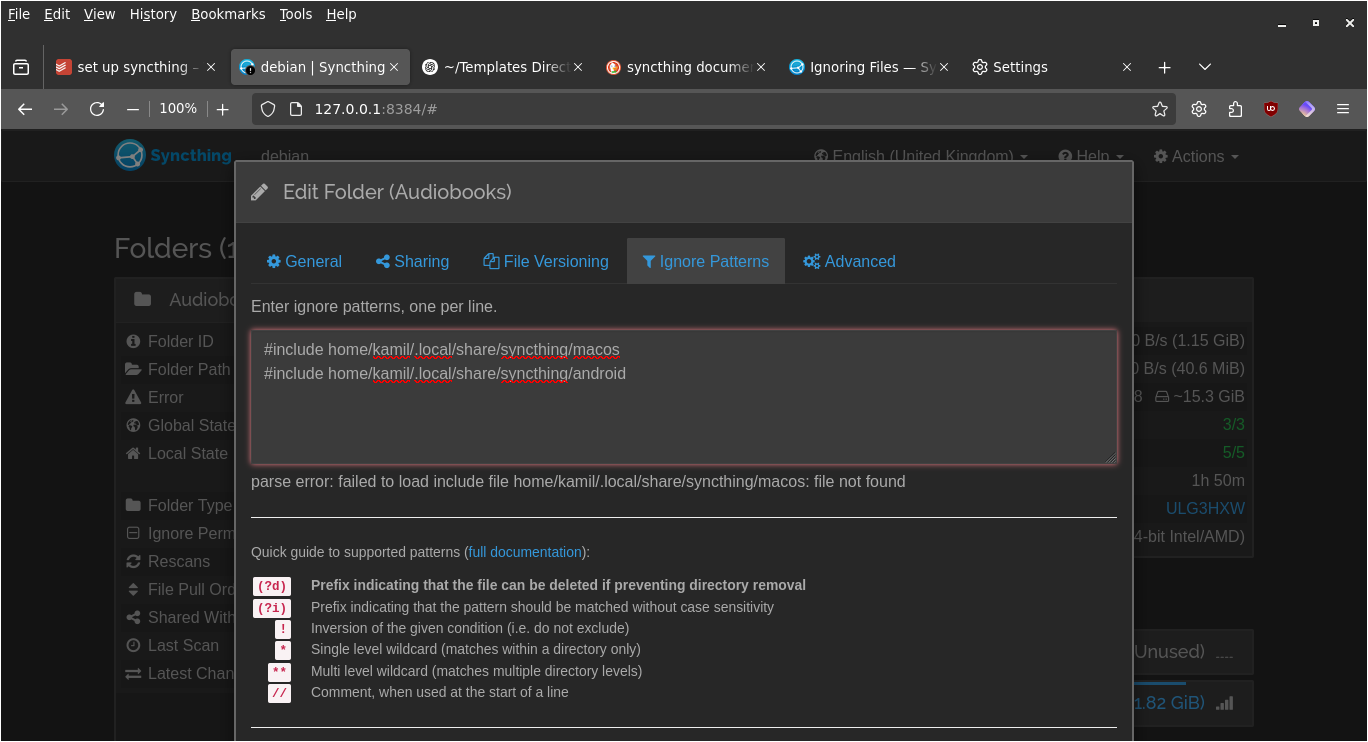
I am pretty sure it is done right based on the docs:
Blockquote
A pattern beginning with #include results in loading patterns from the named file. It is an error for a file to not exist or be included more than once. Note that while this can be used to include patterns from a file in a subdirectory, the patterns themselves are still relative to the synced folder root. Example: #include more-patterns.txt.
?
Any #include directives inside a file loaded by #include require paths specified relative to the directory containing the loaded file, rather than the synchronised root directory.
So this is how it works? It has to be relative to the synced root folder…
If synced folder is ~/DCIM and patterns are in ~/DCIM/patterns then this is what relative means: #include patterns/some-patterns.txt.
Is this correct?
Any #include directives inside a file loaded by #include require paths specified relative to the directory containing the loaded file, rather than the synchronised root directory.
2025-06-17 15:40:29: Error on folder "Audiobooks" (fhq44-qnawv): loading ignores: parse error: failed to load include file home/kamil/Misc./syncthing/macos: file not found
Note how the error says home/ but it’s actually /home/ in the ignore pattern? I tried /home/ before this post too and that didn’t do it.
That is then home/kamil/.local/share/syncthing/pattern.txt with or without the / at the beginning, it does not matter. This does not work as I’ve shown above.
Am I to understand it’s a bug?
loading ignores: parse error: failed to load include file home/kamil/Misc./syncthing/macos.txt: file not found
Note: Here I updated macos to macos.txt to see if maybe the extension in the filename is mandatory.
Huh?! This is literally it copy and paste. I am no newbie to computer and stuff but this puzzles me. Why is it literally ../../ instead of /home/kamil or ~/?
So since the shared folder is two directories up from home, you need to go two directories down in order to be at home again (hence ../../ and then specify the path you want.