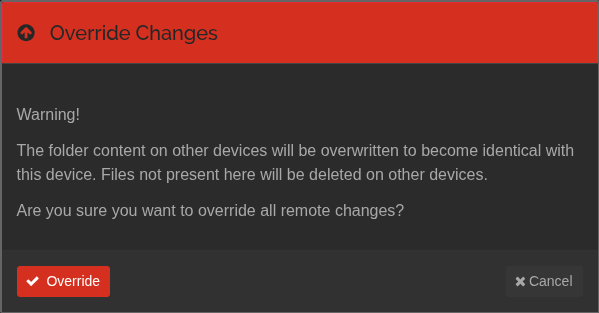
Yes, this is user error, I own that. Yes, I should have done a more recent manual backup in the interim, I own that.
But I am literally shaking and sick to my stomach right now because my “clever” system to keep all my files decentralized and safe in multiple locations just bit me. I lost four months of crucial notes and work over hundreds of files due to ignorantly clicking the “override changes” button on a tablet I hadn’t booted in months (running the android client) which immediately propagated ancient versions to several machines.
I’m posting this just to add to the general algorithmic awareness in case anyone has more sense than me and searches the meaning of the button first: DO NOT CLICK THE OVERRIDE CHANGES BUTTON UNLESS YOU KNOW WHAT YOU ARE DOING.
If there is still a context where this button is used (I guess the android client is EOL) then for the love of everything PLEASE ADD A WARNING. It can have a “don’t show again” checkbox, but FFS this is a nuclear button, and at least to a newbie’s eye it is not well-labeled. I had a folder that was not syncing for no apparent reason and nothing I did seemed to help, so I clicked the button believing it would force-override the local files with remote changes, but it did the opposite.
I’m now going to take a week to emotionally recover from what I lost. May this post help the next person not follow in my ignorance.
I’m still gonna need the week to process the adrenaline and cortisol, but holy &^%$ it’s good news.
The version on my phone had some file versioning enabled (purely by luck). Out of all my devices it was the only one that had any versioning in place. I was sure it was off but thankfully, it was not.
The version on the tablet is Syncthing-Android 1.27.3, the version on the phone is Syncthing-Fork 2.0.11. The 1.27.3 at least doesn’t have the warning.
Apologies if the warning is old news and already added. I did my best to check but obviously have been in a state all morning so I probably did a bad job.
Now please excuse me while I revamp all my data practices and do multiple backups.
There is every once in a while a lively debate here about how people think since syncthing can support offsite transfer of files that it’s a backup solution. You demonstrate the textbook example of why syncthing by itself isn’t a backup solution.
Despite all the discussion recently about slow syncing of large databases, gobs of data can be destroyed and then synced VERY quickly across devices.
As I said, I’m really glad you got your files back. And also glad you posted your plight as an example to other users how quickly things can go bad.
FYI in my case I have many devices syncing to a central server (with version control enabled) AND that central server backing up nightly (via restic) to an offsite backup service.
Yeah, thanks; I typically don’t rely on syncthing as my backup method (instead I have a couple offsite copies, etc), just as a fallback in case my backups are lost. In this case I had been negligent in the offsite backups, and wasn’t aware that there was a method to obliterate everything with a single dumb tap.
I will certainly be enabling versioning! I actually knew about it and use it other places, but retrospectively thought I had it on, etc.
In sum, just another classic tale of multiple misunderstandings and laziness coming together in a perfect confluence. And I’m glad to hear that the warning has been implemented in more recent versions.
Glad you got your files back - I can imagine the panic and sensed of despondency you experienced. Happy for you! I am not a computer Geek - I have mastered Synthing - but it took about three weeks till I fully understood how to set it up and use it properly. Support was very helpful and patient with me; I also leaned on Propensity for AI assistance. Still, I struggle to this day with the meaning of Local Additions and Out of Sync and especially Revert (which I have complained about before) - but to Support’s GREAT, GREAT CREDIT - the notification/warnings are crystal clear - remarkably precise. Thank you, guys. I also use a hub & spoke arrangement only, so I always maintain a Master File. And, of course, backup, backup, backup. Anyways, Kudo’s to everyone in support!! And congrats again for recovering your files. Robert