I’m having a problem that occurs when sync’ing between two geographically separated UNRAID machines, both running Syncthing in Docker containers with PUID 99, PGID 100, UMASK 000. Both have “ignore permissions” set, since both machines use SMB to share folders with local Windows machines.
If I drag Windows files or folders into the SMB share on either machine, they show up correctly on the local UNRAID, and in a few seconds are correctly sync’ed to the remote UNRAID. Since “ignore permissions” is set, the newly created files on the remote machine have default permissions, i.e. rwxrwxrwx for folders (777) and rwxrw-rw- (766) for files. So far so good.
The problem occurs if I drag in a Windows folder that happens to have one or more subfolders. On the local UNRAID machine, the top level folder has permissions 777 (drwxrwxrwx), but on the remote machine, it is 755, i.e. drwxr-xr-x (see screenshot below). These folders are now impossible to rename or delete via SMB. Oddly, the files themselves have the expected permissions (-rwxrw-rw- = 766), as do child directories, and any folders lacking subfolders (777 on both machines). Also, if I create folders one at a time in the Windows SMB, i.e. parent first, then child folders, all will be 777 on both ends, as expected.
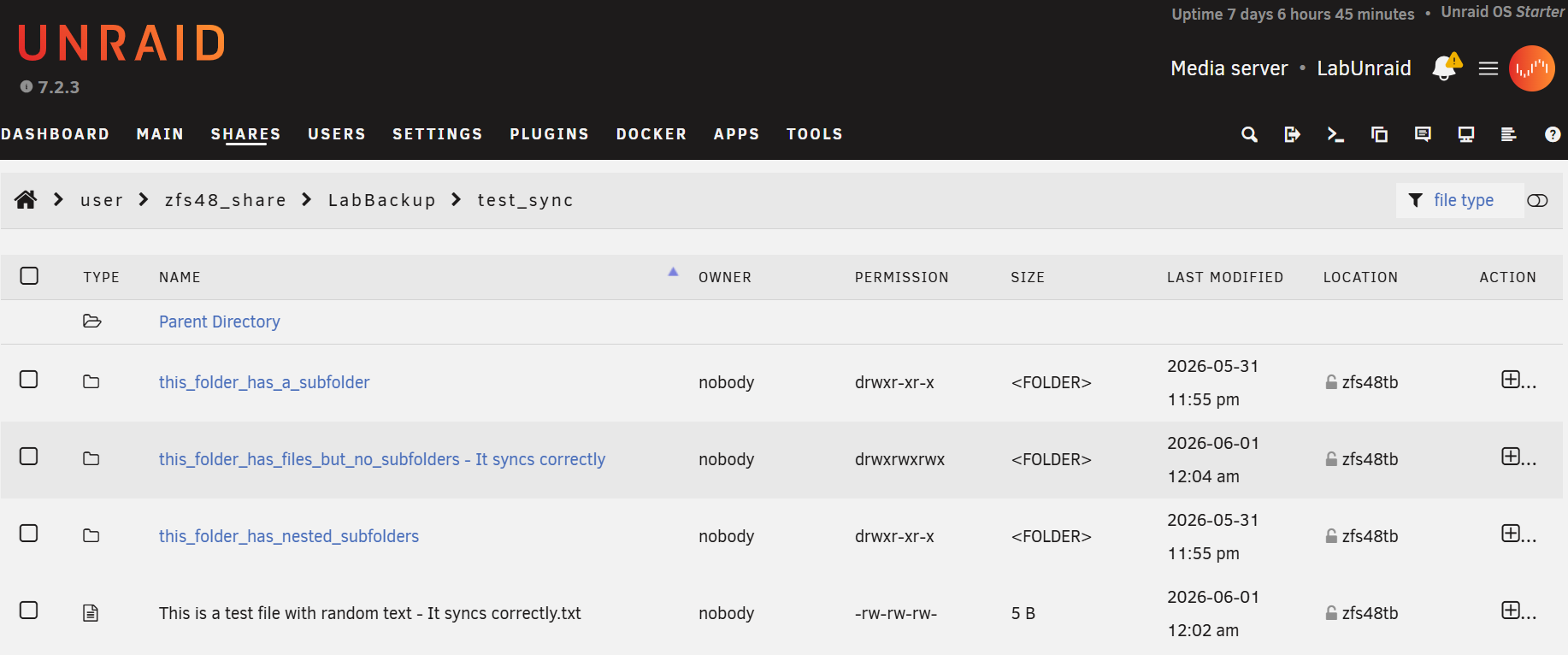
Unfortunately I am now working on a large project requiring frequent creating and renaming of nested folders, so syncthing has become borderline unusable.
Has anyone else seen this? This behavior seems obviously to be a bug, but perhaps I am missing something?