Tried to update to 2.0 and it’s been causing waves and waves of problems, but I’ve ALMOST got most of them solved by mass wiping everything I can find from synching on multiple devices….
And now it’s ALMOST working, and I got this error on a desktop trying to set up a folder to receive files from my android phone.
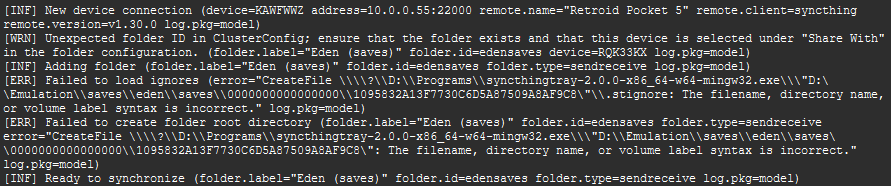
[WRN] Unexpected folder ID in ClusterConfig; ensure that the folder exists and that this device is selected under "Share With" in the folder configuration. (folder.label="Eden (saves)" folder.id=edensaves device=RQK33KX log.pkg=model)
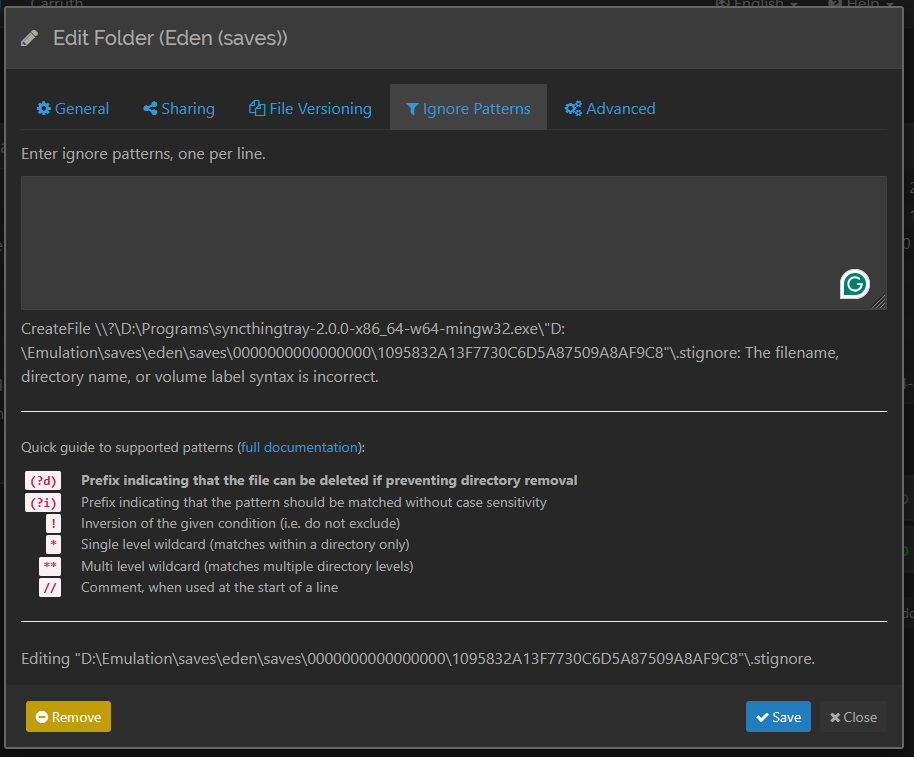
[ERR] Failed to load ignores (error="CreateFile \\\\?\\D:\\Programs\\syncthingtray-2.0.0-x86_64-w64-mingw32.exe\\\"D:\\Emulation\\saves\\eden\\saves\\0000000000000000\\1095832A13F7730C6D5A87509A8AF9C8\"\\.stignore: The filename, directory name, or volume label syntax is incorrect." log.pkg=model)
[ERR] Failed to create folder root directory (folder.label="Eden (saves)" folder.id=edensaves folder.type=sendreceive error="CreateFile \\\\?\\D:\\Programs\\syncthingtray-2.0.0-x86_64-w64-mingw32.exe\\\"D:\\Emulation\\saves\\eden\\saves\\0000000000000000\\1095832A13F7730C6D5A87509A8AF9C8\": The filename, directory name, or volume label syntax is incorrect." log.pkg=model)
First off, had no idea that advanced menu was a thing. Dunno how I missed that and nobody told me about it before because I’ve been dealing with waves of problems with Syncthing for years, lol.
Unfortunately, I went in and looked at EVERY menu/setting and they are all correct. So that added path isn’t happening there.
Looking again, I bet the problem is that it has quotes around it. That makes it not an absolute path but a quoted path component, interpreted as relative to the current working directory… (which shouldn’t be the tray binary, but I guess this is the Syncthing variant that is compiled into the tray app somehow, so there may be something odd going on there.)