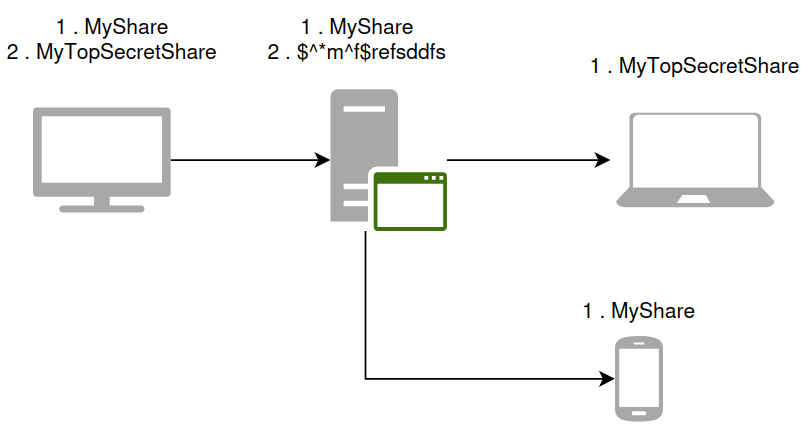
But the problem is that the PC and other devices are not always turned on at the same time. So I use an intermediate server that stores the items I want to share : my sensitive files must only be stored on the laptop.
My unimportant files can therefore be stored without encryption on my server, which is not the case for my sensitive files.
To do this, I tried using the “Untrusted device” option on the connection between my server and each of my devices, but:
It amounts to encrypting all my files, even the unimportant ones.
the server can only receive data, not send it.
If I choose to share “MyTopSecretShare” with a password but only on my PCs, not on the server, I am unable to send data.
So, as I understand it:
the “Untrusted device” option enables encrypted data storage on the destination system (computer > server). The destination can only receive data.
encrypted data can only be exchanged between two workstations if they know the password.
My request is therefore as follows:
Between three computers exchanging data only with Syncthing, with one computer acting as an intermediary, is it possible to allow the intermediary to retrieve encrypted data and make it available without being able to read the data?
The request may seem similar to “Untrusted device” but:
The “untrusted device” does not need to decrypt the data (it only serves as a relay).
The “unreliable device” can still receive non-sensitive data, which can be accessed/used by other means.
Have you tried simply sharing some folders with a password, and the rest without one? You don’t need to use the “untrusted” device option at all. The setting is just there if you want to be extra sure that you don’t share unencrypted data with the device by accident.
I have tried several times, but my computer is always initiating the share (when creating the “send/receive” share, I select the server. On the server, I accept the share) :
computer > server, without password: I was able to send files
computer (password) > server (encrypted reception): the sender can see the file that has been added and is “waiting” for the remote device to accept the share.
On the server (the remote device), I did receive a sharing request from my computer (which I accepted). But I can’t enter a password and it’s set to “encrypted reception.”
computer (password) > server (send and receive): I get the error message “Failed to verify encryption consistency (folder.label=test4 folder.id=my_folder_id folder.type=sendreceive device=my_device_id error=“remote expects to exchange plain data, but local data is encrypted (folder-type receive-encrypted)” log.pkg=model)”
Hello @polc ! I am not certain that you have mastered the basic workings regarding “Untrusted (Encrypted) Devices”.
Let’s assume that we have three devices (using the same names as in the link I provide further down):
T1: This is a device you trust fully. It is in your control.
T2: Same conditions as T1.
U1: This is an untrusted device. Might be at a colo or at a friends place.
Let’s assume you have a share “S”.
Let’s assume you have selected a password PASSWORD.
I recommend that you do like this:
T1: Create share S.
T1: Share S with T2.
T2: Accept share S.
T1: Share with U1 and while still on T1 enter the password PASSWORD.
T2: Share with U1 and while still on T2 enter the password PASSWORD.
U1: Accept share S from both T1 and T2. Do NOT enter the password because this device is not trusted, so you don’t want it to know any passwords or to have plain-text content of the synchronised files.
Hello @martinleben, I believe I have followed the instructions in the documentation.
In the T1 <=> U1 <=> T2 configuration, we agree that T1 and T2 will be able to exchange files via U1, a “relay” that cannot read the exchanged files?
When sharing from T1 to U1:
on the T1 side, I enter a password for sharing
on the U1 side, sharing is accepted (but without entering the password).
I do the same between T2 and U1.
Thus:
T1 contains a text file, which is encrypted and sent to U1
U1 receives an encrypted file from T1 of unknown type and content, and sends it to the other sharing members (T2)
T2 receives an encrypted file from U1, which it decrypts with the same password specified when sharing from T1
Yes, correct. That is exactly how it is supposed to work. If it does NOT currently work for you, I suggest you do this:
Start from scratch using a directory with like only one file in it and then follow the steps I provided. Be sure to double check every step and verify that you get expected results after every step. If you get something expected and is not able to sort it out yourself, don’t hesitate to get in touch again.