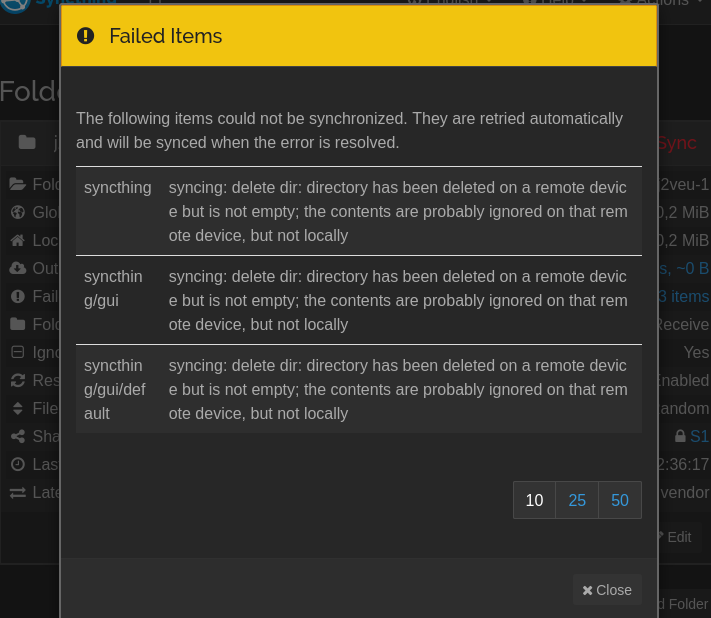
I have a setup with two devices - one Send Only, one Receive Only. I recently deleted several hundred directories on the Send Only device, but syncthing refuses to delete them on the Receive Only device - the error is “syncing: delete dir: directory has been deleted on a remote device but is not empty; the contents are probably ignored on that remote device, but not locally.” (This is incorrect; I have no ignore patterns.)
Is there anything I can do to avoid needing to manually go through and delete the exact same folders on my Receive Only device? Is there anything I can do differently in the future to avoid having to manually delete folders on all devices?
If there are no ignore patterns set on the Receive Only side, then this looks like some kind of a bug. The only thing I can think of right now is that maybe Syncthing cannot access and thus delete some of the files due to permission settings, etc., and that’s why it is throwing the error message in question.
I think the combo of send-only plus receive-only will have about the same effect as ignore patterns. You’re better off using just the one or the other. That said, I’d expect you to have a “revert changes” button on the receive-only side for the scenario I’m envisioning (new files in a deleted directory that the other side doesn’t know about)…
I’m trying to reproduce a deletion bug which seems to be related to encrypted folders. When renaming folders on one side failed items occur almost every time on the other side but are automatically resolved within a minute (or pause/resume):
It is quite different but has similar symptoms. Not sure if this is even an issue since it is resolved after a short time, still wanted to share in case it is related somehow. The receive encrypted folder on a central hub is shared with all other devices which only connect to it.
Tested also with regular folders and it is the same, so not related to encryption in this case. The failing items (empty folders) are removed after about 60 seconds.
Look at that! You are correct, just waiting long enough seems to have fixed it. Took hours in my case, but that could easily have something to do with some peculiarities of my setup (neither device is on 24/7, though they obviously were both on the whole time I was fiddling with this), or maybe just with how much I was tinkering with things trying to figure it out, haha.
Thanks, and sorry to bother you with (apparently) a non-issue!