What are your performance guys? I am trying to figure out whether it’s on my end or is syncthing just slow af no matter settings?
If you have a desktop app try syncspririt, it shows order of magnitude faster on a small files.
It’s a sore spot; I have an experiment with database sharding that speeds it up a lot. As-is, you can gain a couple of magnitudes on the receiving end, for lots of small files, by disabling fsync and block indexing for the folder.
With those settings, syncing 500k unique tiny files takes about 20 minutes on my laptop.
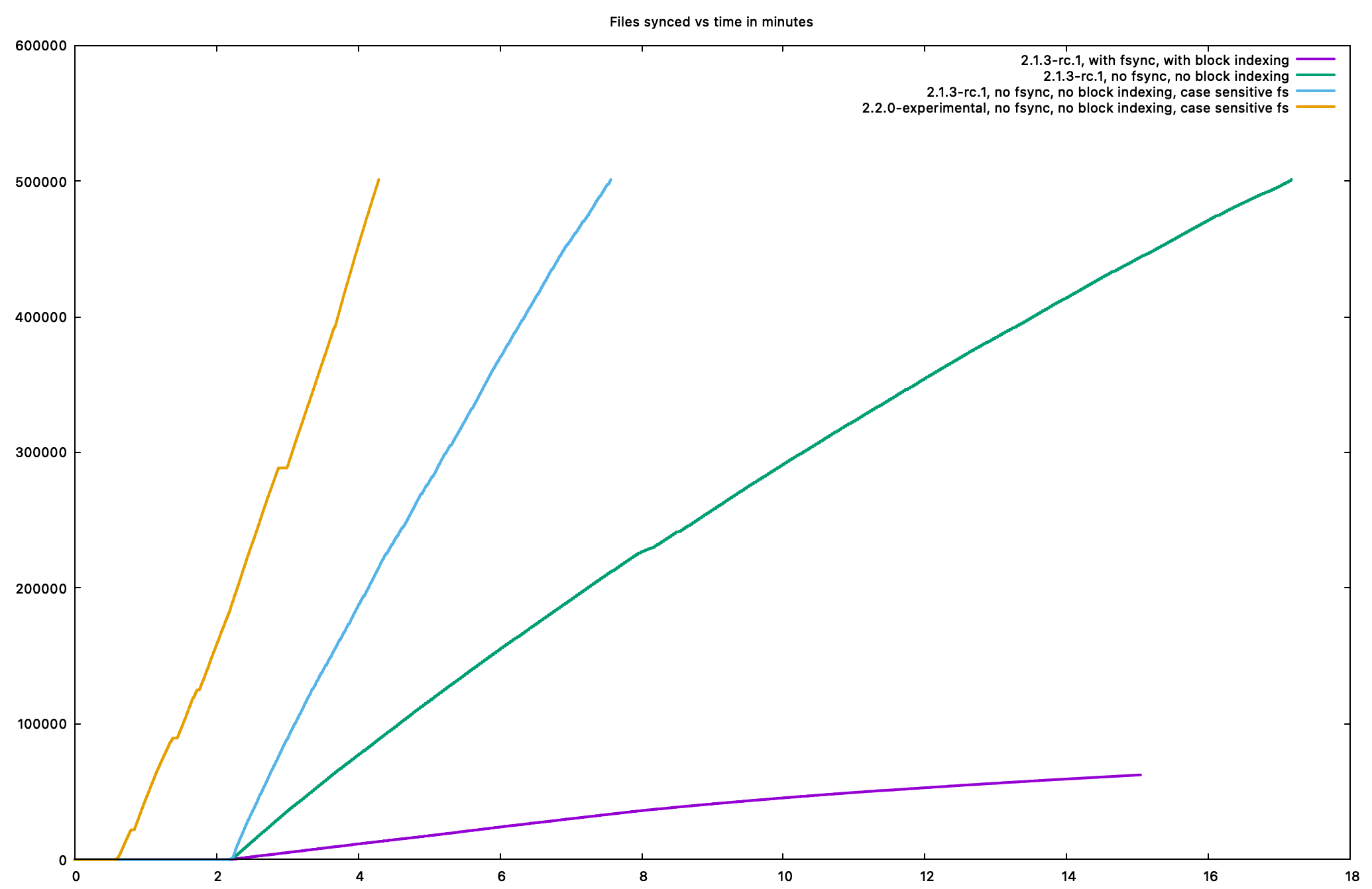
To illustrate, here’s a graph of three runs I did with different settings. It’s minutes runtime on the X axis and number of files synced on Y. With default settings you’re unfortunately on the purple line, which I stopped after 15 minutes an 60k files. Turning off fsync and block indexing puts you on the green line where it finishes after 17 minutes. Also enabling case-sensitive-filesystem gets you to the blue line where it finishes after seven minutes.
It kinda sucks, but these integrity/safety settings come at a high cost.
(The orange line is an experimental branch which happens to cheat by starting earlier, but also keeps a steeper slope so that’s nice.)
I mainly need to sync windows ntfses - i suppose this bench is on linux + ext4?
second thing - turning of fsync will just risk receiving side for data loss (power/crash etc)? I mean - there is no way it will return back corrupted data back to sender? If yes it’s a risk worth taking 
This was on macOS, but yes. Disabling fsync is safe unless you have a sudden power failure. Disable case insensitivity checks is in principle unsafe, but if you know your source data doesn’t have any case conflicts (like, it’s already on Windows) then it’s safe for at least a one time sync operation.
I also just found a way to make those checks a lot faster, so improvements are coming there.
Just to be sure I get it right, if I may;
Disabling fsync might cause a file to be stored corrupt during sudden power failure. However, this will automatically be detected and corrected by Syncthing on the next scan/sync.
Is the ‘however’ part correct @calmh ?
This depends on many things, but in principle no, this cannot be guaranteed. It could happen that syncthing records a successful sync to database, the filesystem rolls back to some other state, generates a change notification that is then picked up by syncthing and synchronized as a change back to other devices. Syncthing has no way of knowing if a change in a file is “correct”, all it can do is sync file contents - whether they’re valid or not.
Databases can do it, so why not syncthing? There can be a log file, a hash to check, so you can always verifiy if integrity is fine. All that should be not fine is either it did or did not happen, but i see no reason a half written file is hashed etc. - isn’t that on the syncthing side, not “impossible to do” side?
Half-written by Syncthing? That’s straightforward, Syncthing doesn’t write/overwrite a file until it’s been fully delivered.
Half-written by some non-Syncthing process? How would Syncthing know that it was half-written?
The model is entirely different here, as syncthing deals with files written by other programs - databases have known-good states (i.e. checkpoints), syncthing has no idea what the “correct” state of a file is.
Perhaps this gets clearer if we look at the process in more detail.
By default, syncthing does fsyncs for each sync operation. It works similar to this:
- Syncthing is notified by a remote device that a file has changed (with a newer version)
- Syncthing creates a temporary file
- Syncthing writes the changes to the temporary file - the operating system has not yet committed the changes to disk
- Syncthing removes the original file and renames the temporary file to the original filename
- Syncthing performs
fsyncon the temporary file, committing the changes to disk - Syncthing commits the successful sync operation to its internal database
This is fairly robust against power-loss events, as any loss before the final commit will result in syncthing knowing that the file has not been correctly synced. A power loss after the final commit has no effect either as far as syncthing is concerned (sync already complete).
Now let’s view the scenario without fsync and see what could happen:
- Syncthing is notified by a remote device that a file has changed (with a newer version)
- Syncthing creates a temporary file
- Syncthing writes the changes to the temporary file - the operating system has not yet committed the changes to disk
- Syncthing removes the original file and renames the temporary file to the original filename - the operating system has not yet committed the changes to disk
- Syncthing commits the successful sync operation to its internal database - the operating system has not yet committed the changes to disk
- A power loss event occurs - the operating system looses some (but not all!) uncomitted changes
- After the reset, we assume that syncthing sees a committed change in its database (i.e. database is on a different disk which did successfully commit). However, in what state is the temp file?
- The filesystem has reverted to a state before the rename, with a partially written temp file
- or, the filesystem has already committed the rename, but has reverted the file contents to a partially written file (or even some total garbage, the filesystem might have been aborted at a very bad time while switching out block pointers)
The latter case is particularly bad, because for syncthing this is indistinguishable from an application writing to the file - it has no idea that the user did not command this file change. As syncthing syncs file changes, it may pick up the new state of the file as a change and sync it. There’s no way for syncthing to know that this is a bad state, as the filesystem “lied” about committing changes to disk - it’s allowed to do this, as sycnthing did not fsync the changes before committing the change.
It depends on many factors if the above scenario is actually realistic - if you have a good filesystem, kernel, drivers, and hardware that doesn’t do badness you may have nothing to worry about. But as far as syncthing is concerned, without fsync there’s no protection from the syncthing side.
“Syncthing removes the original file and renames the temporary file to the original filename - the operating system has not yet committed the changes to disk” - is there no possibility to hash that file - check if it has been written and THEN remove original->replace it with new version? or hash will take RAM version that is not yet written to disk? Btw - syncthing could always keep n last files / n bytes of files in local cache for safety reason
This is what fsync does. It tells the OS “I want to wait until this file is actually written”. The scenario discussed is precisely what happens when you don’t want to wait - in this case there’s no way to know when this happened, no. Reading the file does nothing - the OS will give you data from its dirty write cache. The OS always provides a consistent view, as long as its invariants (no system faults) are upheld.
Trying to augment OS mechanisms is usually a bad idea, and I fail to see what this would add in any case.
Problem i have with this speed is that 10-20files/s on ssd isn’t normal, i can copy with basic explorer with hundreds per second, so there is something off even with fsync
Usually because your explorer doesn’t fsync every file change - it just relies on the OS to commit eventually. Depending on your system, you can check this by watching disk activity (with any resource monitor) while copying data - does the disk writes drop to zero exactly at the same time when a 10GB write finishes? Or does it continue to write for another ~10s? If it’s the latter, your copy tool lied to you and did not wait for the writes to finish before claiming they were. It’s way faster to do it this way, but it’s not perfectly safe.
(There are many others factors to this as well. Syncthing does way more stuff than a simple copy which also slows things down, and flushing the buffers after every small write is much worse than fsync’ing in batches, which some other programs do (i.e. this is what databases do to not pay hefty performance costs on every write). This is a performance optimization that is technically possible, but not yet implemented in syncthing. Actually this is implemented nowadays, missed that)
From which version?
Will be in v2.1.3 if nothing gets in the way.
I think this is still misunderstanding the point of failure which is possible with fsync disabled for higher performance.
It is NOT a problem about the temporary file having been written, verified and recorded correctly.
Even if all that has been recorded fine, but there is some kind of damage or rollback on the final file after a power failure, Syncthing may simply see that the new file is different. If our record about the file last written is flawless, Syncthing must still assume that an external program has modified the file deliberately. Thus it will sync the corruption back to all other peers.
aah, fair point @Nummer378 , that makes sense, thank you for clarifying. Somehow I fooled myself by thinking in the classic way, with a sender and a receiver, not in a two way sync. I guess my statement is still valid on a one-way transfer, the corrupt file at the receiver will be caught on next scan.