I have already done the 170-hour database migration that came from the 2.0 upgrade. I recently upgraded to 2.0.6 and got a CLI output on the web interface.
This has been running for more than 24 hours with no new entries.
there is no progress listed like the last time. This is equivalent to the logs as well.
I have another machin thats way more powerfull and it finished without me even noticing. This one took 170 hours last time to do the migration. its a 5800x to its not super low end.
Should I just leave it and wait? I hate not having a second copy of my data offsite.
Honestly, if there is no further output in the log, it sounds like something got stuck or Syncthing got killed by the OS. First of all, I would suggest upgrading to v2.0.7, because there are major performance improvements in this release. Then, you could try to start Syncthing again and see what happens.
There is no option to upgrade to 2.0.7 on TrueNAS yet. Probably will be updated in a day or two. I did restart it and imidiatly got the same 3 log lines and then nothing. its not using any processing power or hitting the hardrives.
I will give it a day or two and see if moving to 2.0.7 helps.
I didn’t get to see the process, but on my other server with the same files, it did complete. It’s a much more powerful machine. 192 core xeon E5 v4.
I don’t think the lag of logging is indicating anything. Unlike the v1 to v2 migration this isn’t looping over one set of data updating another set in batches, so that progress can be obeserved and logged - it’s all happening in sqlite, the app is just waiting for that to finish. You should be able to observe DB file growth as a sign of “something progressing”.
It has been over 12 hours with the new 2.0.7 update. logs still show notihng and Truenas reports 389gb of IO. At this rate, it would be 20+ days of waiting. Once again, being faster to start over than to upgrade. Something is not right. My array can sustain 700MBps, and a 5800x is no slouch. It’s not being held back by hardware.
I get the whole “wait” idea, but not having an off-site backup of my data for 20 days every update is gonna be an issue. especially with no way to know if it’s actually doing anything. If all of us on TrueNAS waited patiently for the 1.0 to 2.0 upgrade, we would still be waiting. There was a bug that caused the service to be killed.
Mostly out of curiosity, could you explain how you estimate this? I don’t entirely understand what the reported 389 gb of IO refer to but even if I knew, I’d expect a rate and a target to be able to extrapolate a duration but there’s only one value here.
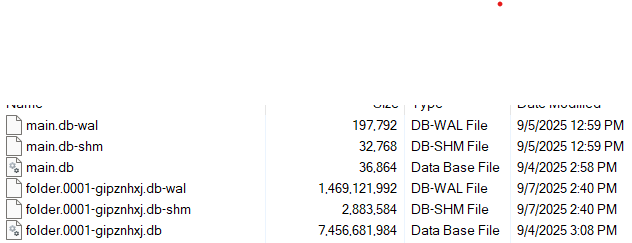
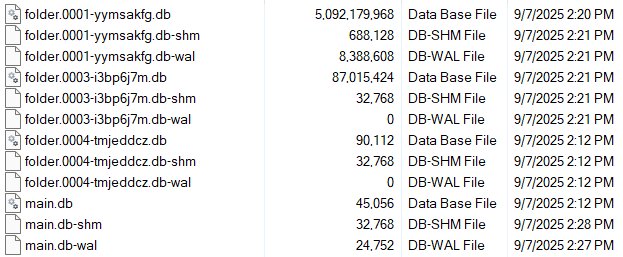
I guess we’ll need some status indication for this too - I didn’t expect this migration to take particularly long. As we don’t have that for now, to observe progress can you please check the sizes of the files in the syncthing DB directory. Use your favourite tool to get the sizes (e.g. ls -lh) and note the time. For one folder-* set of files after the other, over time I’d expect the *-wal files to grow quite significantly, then a period of not much happening when data is moved from the wal to the main db, and then the *-wal shrinks to size 0 (or is entirely removed). Then the same thing for the next folder.
Well, it’s a race now, boys. I am worried about this being an ongoing issue, so I built another 100tb array and set up sync. We will see if I can sync all the data to the new server over the internet faster than the database can migrate.
It’s not looking good for the team database migration. TrueNAS has IO at 560gb of 14tb so far. But after only a couple of hours, sync on the new server is at 128 GB. That’s 9 days vs the 19 I predict on the database migration.
Is everything, including the database, located on the same array of spinning disks? If the CPU is Ryzen 5800X (as specified in the original post), the performance you’re reporting seems extremely poor. I don’t sync that much data anywhere, but I do have two Windows machines syncing 3.5 TB of data (one with Ryzen 4350G, one with Ryzen 5700G), and migrating the database is a matter of minutes. Everything is located on solid state storage though.
Could somebody explain the NAS-ish numbers to someone like me that doesn’t speak NASian? “TrueNAS has IO at 560gb of 14tb” means nothing to me. And we are talking about a DB migration here, I hope you aren’t looking at a DB that’s 14TB
Is everything, including the database, located on the same array of spinning disks? If the CPU is Ryzen 5800X (as specified in the original post), the performance you’re reporting seems extremely poor. I don’t sync that much data anywhere, but I do have two Windows machines syncing 3.5 TB of data (one with Ryzen 4350G, one with Ryzen 5700G), and migrating the database is a matter of minutes. Everything is located on solid state storage though.
Yes, it’s all on the same array of 16 disks. They are spinners but easily maintain well over 1000MBps. So I would agree that something else is up.
Sorry. I forgot that we are not all on Truenas. I was using the only metric I have since Syncthing is not providing any logs. In Truenas, you can see the disk I/O of any application. I am watching the read I/O as some indication of how far Syncthing has made it through the 14tb of data that is stored. It could be completely irrelevant, but it’s all I got right now.
It definitely isn’t relevant to the migration, as the DB migration is migrating… data in the DB - it’s not reading any of the data in the syncthing folders. Whatever that IO metric is supposed to say, 560GB doesn’t make any sense in this context.
It’s not all you got though:
Unless you can’t get actual filesystem access in TrueNAS in any way?
Yes and no. Is it a direct indicator for how things are going….who knows. But what it is is an indicator that Syncthing is still reading files. And if it happens to want to read every bit on the disk I will see it in this number.
you can access the filesystem on truenas but its a pain and I dont have it setup on this box. by defualt the IX-apps folder where we need to look is hidden from the end user. you can build an ACL or allow ssh for root and get to the files but its a pain and I havent goten there yet.
What I have done is given the migration a 1-day head start and built another system that is syncing over the internet right next to this system.
Migration is at 564GB read.
The new system is at 221gb synced.
If all is equal, the new system is going to smoke the database migration….. that’s a big issue.
The syncthing-2.0.8 package in TrueNAS is still pathologically slow on large datasets such that it is unfit for purpose. If a database migration doesn’t finish within minutes, then it won’t finish within weeks or months.
The failure mode persists even when extra system resources – CPU, Memory, Disk – are added to the container.
I don’t know exactly how big a dataset must get before the failure expresses, but the malfunction is quick and obvious when it happens.