Beta 4 is released, which fixes the upgrade behaviour from v1 to v2. The SyncTrayzor v2 installer can now safely install over an existing v1 install. The installer will detect v1 and uninstall it before installing v2. Existing SyncTrayzor configuration (including syncthing.exe) can be preserved (the installer asks). 32-bit versions are prevented from upgrading, as v2 does not support 32-bit.
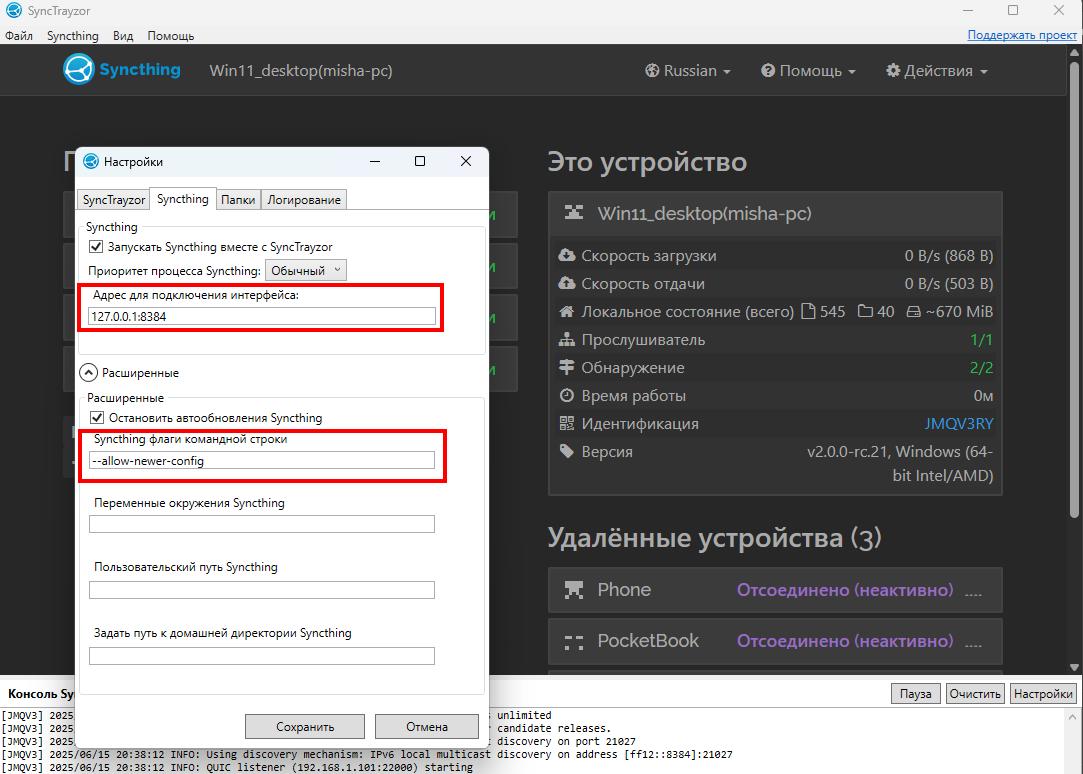
WARNING: Failed starting API: listen tcp: lookup localhost on 8.8.8.8:53: no such host
Solved: changed the parameter from localhost:8384 to 127.0.0.1:8384
syncthing.exe : error: unknown flag -a, did you mean one of "-h", "-C", "-D", "-H"?
Solved: changed the line with the old arguments format from “-” to --allow-newer-config
I don’t remember if these parameters were mine or the default, so I’m writing about them.
The default syncthing arguments in that window are empty, so you added those manually in the past.
This is interesting: Your machine does not appear to have a hosts entry for localhost and so tries to resolve that via external DNS servers. Windows does have that by default though.
I think there’s a memory leak. I have noticed that where there’s a lot of syncing from lots of folders, the memory use goes right up and it becomes very laggy. I have ran Syncthing natively, no Synctrayzer all weekend and has been fine. Im on Beta 4
There’s a memory logger built into SyncTrayzor that periodically logs memory usage. Can you send the SyncTrayzor log file? You can find it through File -> Settings -> Logging -> Show SyncTrayzor Log File
Yup there’s definitely 10+ Gigabytes of heap memory being allocated. Not sure if it’s leaking though, or if the GC does some madness. Will look into writing an improved version of the memory logger that hopefully has more insights into what’s going on.
Quick question: If you have the activity popup open while memory usage is high, does closing and re-opening it again reduce memory pressure? How many files do you change, approximately (in terms of magnitude - hundreds or millions?)
The only memory leak I could easily find is that if you have the activity popup open for a very long time (or you have many, many changed files) it does accumulate WPF entries for the popup. I could barely manage to leak a gigabyte in an hour though, and this was with a simulated setup with millions of changed files.
Other than that I couldn’t spot anything obvious. I’ve also changed the memory usage logger to be hopefully a bit better.
I’ve released beta.6 today, only noteworthy change is a fix for v2 conflict handling: In syncthing v2, deleted files can win conflicts “against nothing”, resulting in only a single conflicting file. This broke assumptions in SyncTrayzor about how conflicts work in syncthing. These conflicts should now appear like all other conflicts within SyncTrayzor’s conflict resolution tool.
If all goes well, my plan is for this to be the last beta release for SyncTrayzor v2. I intend to release SyncTrayzor 2.0.0 at approximately the same time as syncthing v2. There will likely be a 2.0.1 release shortly thereafter, in order to get auto-upgrade messages out for people still running older betas.
Not without some changes to how the popup currently works, no. However, as a workaround, at least on my machine the popup is a bit delayed after the mouse click. The popup opens at your current mouse position, so if you click on the icon and then move the mouse fast, the popup opens in a different location.
Yeah, there is nothing that can be done about it, as blocking that would require changes to the original project, which is archived and no longer maintained.
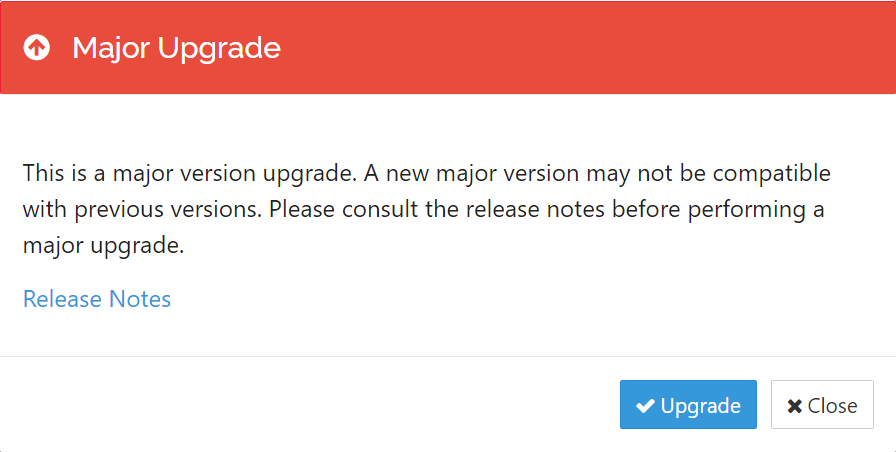
For record, it doesn’t upgrade automatically, and if you do click the upgrade button, you are warned that the upgrade may not be compatible: