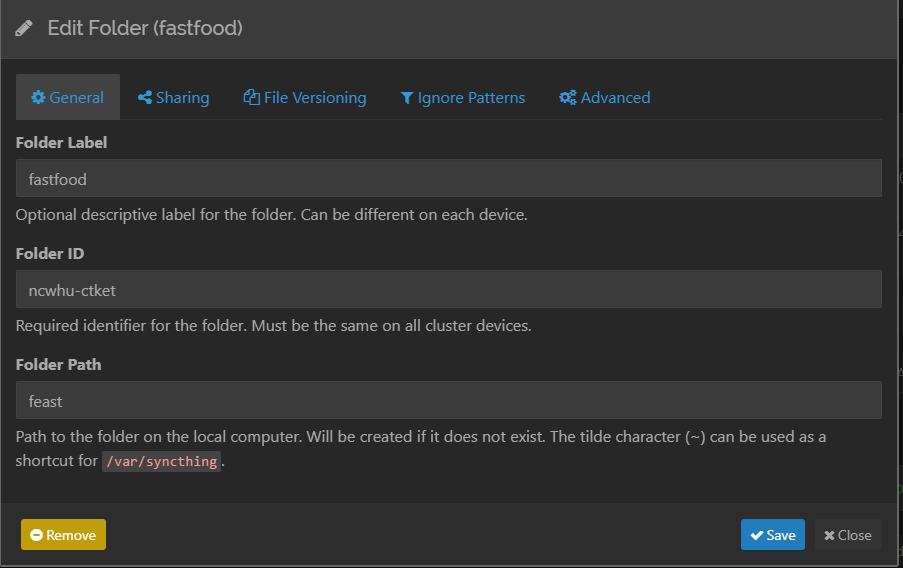
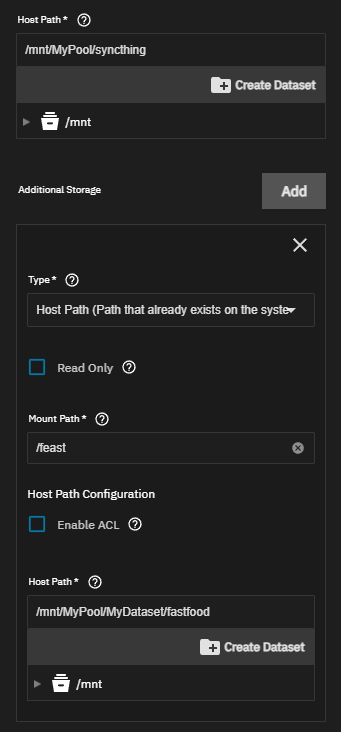
Okay I finally figured this out. My issue turned out to be with my TrueNAS instance of syncthing. I was sharing from my seedbox to TrueNAS. In TrueNAS I setup a dataset for syncthing, but I didn’t actually want to sync anything there. I wanted to sync to some other datasets. So when it came time to choose the folder path for the shared folder, I was entering the absolute path that I wanted the files to end up in. BIG MISTAKE. Unfortunately this manifests as no files appearing anywhere and no error messages. The files don’t even appear in the syncthing dataset.
So, to fix this, you need to add Additional Storage in the syncthing app settings. You chose the internal Mount Path for inside of the syncthing container and the Host Path actually want the files to go.
Then when setting up the file path for the receiving folder you need to specify the Mount Path folder. Hopefully this is helpful to anyone else setting up on TrueNAS. Definitely was a head scratcher for me!~