You need to have everything, i.e. both the config, the database, and the folders, set up with relative paths.
For example:
-
Place both
syncthing.exe(Windows executable) andsyncthing(Linux binary) in the same folder calledSyncthing. -
Start Syncthing from that folder using
syncthing.exe -home=.\filesin Windows, andsyncthing -home=./filesin Linux. -
Use relative paths for your folders, e.g.
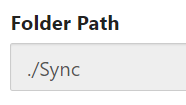 .
.
This way, you will have a portable installation with a folder structure resembling
Syncthing
    files
        index-v0.14.0.db
        cert.pem
        config.xml
        csrftokens.txt
        https-cert.pem
        https-key.pem
        key.pem
    Sync
    syncthing
    syncthing.exe
which you can move around and run Syncthing from it wherever you like between Windows and Linux.
Also, just a disclaimer, but please do not use your real data while experimenting with this.